Photoessay: The Maitres du Temps Chapter 3

This watch was an early production prototype photographed for my client, which is the Manufacture. [Puts on horological hat] It’s an interesting piece because it carries clear DNA from its creator – Kari Voutilainen (the dial) – whilst at the same time retaining the brand’s own DNA (the rollers). It’s a substantial but not oversized watch at about 42mm in diameter; contained inside are time functions, small seconds, date, synodic moon phase indication, day/night indicator and second time zone display. The latter two functions are hidden under panels on the dial at 12 and 6 that retract slightly into the plane of the dial and rotate out of the way, activated by the button concentric to the crown. The button at 9 advances the second time zone display (under the panel at 6). You can see the action of the panels in the final two images. Maitres du Temps is an interesting brand because it collaborates with famous watchmakers to create the various ‘Chapters’ – they do have an in-house execution and assembly facility headed by the noted Andreas Strehler, but each project always lands up different because it carries the DNA of the master watchmaker in charge of the project. Chapter 3 looks nothing like 1 and 2; they were of course designed by completely different watchmakers. Personally, this piece is by far my favorite – I think of it as classical, with a twist. MT

This series shot with a Nikon D800, AFS 60/2.8 G Micro, and several SB900s. As always, clicking on an image brings you to the Flickr landing page, from which you can view a larger version.

_8004236 copy

_8004654 copy

_8004545 copy

_8004458 copy

_8004426 copy

_8004351 copy

_8004482 copy

_8004381 copy

_8004330 copy

_8004265 copy

_8004189 copy

_8004182 copy

POTD: When color might have been preferable

_MM1_L9995527bw copy
Postmen. Leica M-Monochrom, 35/1.4 ASPH FLE

One of those times where color would actually have been better. The bright blue and red uniforms of the motorbike postmen in this shot stood out well against the gray tarmac…I reached for a camera instinctively, nailed focus and exposure, but didn’t realize I was holding the M-Monochrom instead of the M9-P! Still, the geometry of this shot is its saving grace, I feel.

Today is going to be a busy day. Many people wonder what photographers do in the time they’re not shooting – well, here’s my schedule:

1. Client meetings
2. Test prints from M-Monochrom, 50 APO and D800E for clients, and if I have time, a quick article/ note on the site about relative print quality
3. Have to buy a light, strong, compact tripod in preparation for a trip (did I mention those are all oxymorons?). Tripod choice is another minefield I’ll probably write about at some point.
4. Retouching work for another client
5. Chase payments once Europe wakes up
6. Intersperse with replying email and comments to the site – between the two, I get an average of about 100-150 per day, which eats up a good couple of hours in replies. My laptop keyboard is now mirror smooth! 🙂

I think I need an assistant. MT

Minor firmware update: Nikon D800/ D800E

Sadly, it doesn’t seem to address the AF issue yet (if it is at all addressable via firmware) – but those of you who’ve been having problems with the camera freezing in playback mode, or wireless transmitter use, or D lighting shadows – here’s your fix. D800 and D800E

Translated, and linked:

A quick interview in Spanish for ‘Como la Hice’: click here translated by Calvin Dexter

The Leica X2 review translated into Mandarin Chinese by Tsian: click here

Black and white conversion options

_3100_DSC0450bw copy
Water drops. Nikon D3100, 60/2.8 G.

I’ve gotten a lot of emails after the Leica X2 and M-Monochrom reviews asking about B&W conversion and processing; I guess the M-Monochrom announcement had a knock on effect on the way people started seeing things. It doesn’t make color cameras redundant for B&W work, though.

Let’s start by demystifying two things.

1. Certain cameras have certain particular B&W characteristics. True, but only if you use JPEG. If you are shooting RAW, they provide different starting points – this is from a tonal response point of view – but ultimately you can get a consistent look regardless of the camera. I know, because I do this all the time.

_DSF1170bw copy
Singapore. Fuji X100

2. There are benefits to a monochrome-only camera. True. The Bayer filter and subsequent conversion is an interpolation of neighboring pixel image data to extract color information; luminance information is lifted from the photosite. Any sort of interpolation will reduce tonal accuracy and increase noise, because the luminance value you’ve got is now an approximation instead of a true value. However, it’s fairly easy to see that whilst there are benefits to shooting monochrome-only, you can actually convert a color RAW file into a monochrome one, and lower the perceived amount of noise – though not to as low a level as a monochrome-only camera. If you have a poor interpolation method, then the luminance values can be affected too – once again, increasing the perception of pixel-level image noise in a color image. Bottom line: yes, lower noise, and yes, better detail.

_M9P1_L1014802 copy
Trees. Leica M9-P, 21/3.4 ASPH.

Also one of the images available in my print offer.

However, what you lose from a monochrome-camera is the ability to do control the relative luminance level of individual color channels. Why is this important? Suppose your color scene has a relatively small range of background tonal values, but your subject is a very different color. Its luminance may be the same as the background, but it stands out because of the difference in color. As we concluded in a previous article, this kind of image is a very bad candidate for B&W conversion off the bat, because you’d land up with something very flat-looking. (Real life translation: running out and buying an M-Monochrom isn’t going to solve your B&W conversion woes, but it will give you an interesting starting base – especially when it comes to noise and dynamic range. Those of you who don’t mind doing a bit of work, hold on to your normal cameras. And in fact, these techniques apply to the M-Monochrom too.)

_7006528bw copy
Noryn Aziz in the spotlight. Nikon D700, 24-70/2.8

Actually, if you’re prepared to do some work, this not necessarily the case. It’s still possible to separate the subject from the background on the basis of luminance only; you just need to work a bit harder. You’ve even got a few options here. Park that thought for a moment, we have to introduce the basics of B&W conversion first.

_M8_L1022658bw copy
Shadows. Leica M8, Voigtlander 50/1.1

_5000935 original
A sample image for the purposes of demonstration for this article. This is the original file, converted from RAW, with all of the sliders set to zero. Olympus OM-D, 45/1.8.

The simplest method is to desaturate. All this does is throw out color information, and leave luminance information only. You are then free to do whatever you wish to complete processing of the file. After much investigation and experimentation, this is actually the method I use, coupled with another trick or two. Desaturation can be done in ACR (saturation slider, first tab) or in Photoshop (Hue/Saturation tool, then desaturate the master)

_5000935 desaturate
Straight desaturation. Note overall lack of contrast.

Slightly more complicated is the gradient map. You can use the standard linear black to white transition (press D in photoshop first, then add a new gradient map adjustment layer) – which gives very similar, but not quite the same, results as desaturation. Gradient maps with a straight gradient tend to be a bit more contrasty than desaturation. If you want to experiment a bit, it’s actually possible to put in intermediate control points into the gradient and bias it towards a high key (mostly white, black fades out faster) or low key (black stays for longer) look. What actually works here will depend on your image, however, so be prepared to do some fiddling. The good news is that if you use a new adjustment layer, the gradient is easily modifiable without having to redo your entire conversion.

_5000935 grad med copy
Gradient map, linear gradient. Note increased contrast over the straight desaturation.

_5000935 grad lo copy
Gradient map, low key gradient (mostly black)

_5000935 grad hi copy
Gradient map, high key gradient (mostly white)

Finally, we’ve got the channel mixer. Best used on the RAW file in ACR, this lets you decide how much of each individual color channel goes into making the final image. Note that the tool only uses the luminance components of each channel, and it’s additive; this means that color (and perceptual color) information is discarded. To make things even more complicated, there’s a separate B&W conversion adjustment layer in Photoshop itself that effectively does the same thing as the ACR conversion, but it only has six channels for you to play with instead of the eight in ACR.

_5000935 channel mix red heavy
Channel mixer via ACR, decreased reds; note how the subject (in this case, predominantly in the yellow channel) stands out more from the background.

Remember the conundrum of how to isolate a different colored, but similarly luminous, subject from the background from earlier? The solution to this is the channel mixer. You can increase the luminance of the primary color of your subject, and decrease that of the predominant background color; the converse also works. The problem comes when you’ve got a mixture of colors in both subject and background, and some of those are common colors. (Don’t get carried away though: remember that some images just don’t work in black and white).

This isn’t, the entire toolkit, of course. You’ll find that after this kind of conversion, things look rather flat. That’s because a lot of how the human eye perceives contrast and separation is dependent on differences in hue; obviously we have removed that, so we have to artificially put it back in again. Two of Photoshop’s tools will be your best friends here: the dodge and burn brush, and the curves tool. Understand how both of these things work, what the dos and don’ts are, and you can work magic with any B&W conversion. A tablet is also extremely helpful for these things, as it gives you precision control and feathering over your brush application. It lets you avoid hard edges, odd abrupt transitions, and permits highly precise editing.

_5000935 desaturated grad  copy
Desaturation with grad blue filter layer in multiply mode (higher density at the bottom of the frame) to darken the bottom red sign

At this point, it’s probably worth talking about plugins and filters. The former are either a set of Photoshop actions, or a separate program, that controls the conversion – specifically the luminance translation of each colour channel into a luminance value – and the tonal map of the final file. Whilst they are extremely popular and used by many ‘internet street photographers’ either to save time or because they are unable to get their desired results from a nuts and bolts conversion, I personally avoid them because they do not give you enough fine control, and even worse, everybody’s images that were run through that filter look the same. There is no personality or skill in that.

Photography is arguably art and very much down to personal taste. If you are 100% happy with the way those results look, great; I’m jealous of the amount of time you’ve saved in your workflow. However, claiming this is art is disingenuous; it’s like finding out Ansel Adams shot BW400CN (a B&W film designed to be run through a C41 color processing machine) and developed it at the local pharmacy – instead of Tri-X or Plus-X, controlling his development time and chemical composition, and then cutting precision masks to dodge and burn portions of his subjects.

_5000935 copy
That ‘arty’ high contrast, high grain look. It’s actually what heavily pushed Tri-X used to look like, but how many people actually know that firsthand?

There’s a second type of filer that’s useful, and in either form, it performs a similar function to the channel mixer – it either admits or cuts out light that’s of a certain range of wavelengths. The most common example of this is a physical red filter that goes over the end of your lens; the effect is dark skies, because very little of the blue spectrum passes through the red filter and onto the recording medium. It works with digital too, but you have to remember to adjust exposure accordingly, and obviously not use it in color mode. You can also replicate this effect digitally. Add in a new layer, make it one color, and then select the appropriate blending mode; then only do your B&W conversion. There are interesting results obtainable through this method.

_5000935bw copy
Final image, desaturation + curves + selective dodge and burn + second round of curves + slight palladium tone layer

If you pull back the B&W conversion layer slightly – assuming you didn’t directly apply the conversion to the image – then it’s also possible to use a color layer to create a toning effect; sepia or platinum is probably the most common. You can even use a graduated fill layer to provide a variable effect; this is especially useful for increasing the density of skies, for instance.

Personally, I prefer to shoot color and then convert to B&W; not because I can’t decide upfront how a scene should be presented, but because there’s a lot of flexibility in how I want to handle the conversion later to highlight certain aspects of my subject, or achieve certain tonal looks.

I’ll go into detail on my personal B&W workflow with an end to end example in a future article. MT

This post was brought to you by Ming Thein’s Email School of Photography – learn exactly what you want to learn, when you want to learn it. Don’t forget to like us on Facebook!

POTD: Construction site cubism, and a minor site organization change

_5000941 copy
Construction site cubism. Olympus OM-D, 45/1.8

I’ve also archived the most interesting posts for each category under their respective headers, so it should be much easier to find older articles/ posts in future. Let me know if it works or doesn’t work for you. MT

Photoessay: Landscapes with the Leica M-Monochrom

Sadly the M-Monochrom had to go home on Wednesday, but I did get a chance to make another quick set of images with it. Landscapes with the MM are slightly tricky, as the subtle tonal variations that normally make a nice landscape don’t work in luminance-only B&W. Instead, you have to force yourself to look for those extremely contrasty scenes which you’d probably normally be avoiding with a color camera and conversion.

I also want to address one of the major criticisms I saw on my earlier review regarding lack of mid-gray tonal variation: given limited time to shoot and lots of rain, I only managed to get the camera out around midday – which in the tropics, means extremely harsh light. This is of course the enemy of nice mid tones; there’s only so much you can do here under these conditions. Furthermore, web compression is not doing the images any favors – the subtle differences are being crushed into those 8×8 pixel JPEG blocks. The files do look a LOT better at full size, uncompressed on a good monitor. I suspect they will print even better still, but I haven’t had time to do this yet.

Now here’s a thought: Why doesn’t Leica do an X2 Monochrom for people who want B&W-only resolution, tonality and acuity, but would also like AF and a more compact package? MT

This set shot with the Leica M-Monochrom, 50/2 APO and Zeiss 28/2.8.

_MM1_L9995728bw copy

_MM1_L9995872bw copy

_mm1_l9995825bw copy

_MM1_L9995761bw copy

_MM1_L9995763bw copy

_MM1_L9995792bw copy

_mm1_l9995785 copy

_MM1_L9995860bw copy

_MM1_L9995804bw copy

_MM1_L9995780bw copy

This post was brought to you by Ming Thein’s Email School of Photography – learn exactly what you want to learn, when you want to learn it. Don’t forget to like us on Facebook!

May 10, Part 3: Bayer vs. non-Bayer: Leica M-Monochrom vs. Nikon D800E

_MM1_L9995676bw copy
Nadiah. Leica M-Monochrom, 50/2 APO

The final part in this triptych aims at examining the differences between Bayer and non-Bayer sensors. Part one was the review of the M-Monochrom; part two, the APO-Summicron 50/2 ASPH.

Note: I’ve been informed by Leica that both camera and lens are prototypes, and there may be changes between now and the final release product.

Operational and system differences aside, the aim of this portion is solely to look at how the sensors render images in black and white, and to examine pixel-level files and resolution advantages of the non-Bayer sensor. It’s frequently claimed that the Bayer matrix removes between 30-50% of the real resolving power of the sensor – i.e. a non-Bayer sensor of the same pixel count will have somewhere between 1.5x and 2x the resolving power. Since the M-Monochrom’s sensor is 18 MP and full frame, what better to compare it against the 36MP (2x) also full frame Nikon D800E? Both cameras have no antialiasing filter, which evens out the playing field somewhat. I’ll also go on later to look at noise, tonal rendition, and ultimate image potential, which is to say, what I can do with those files in the conversion.

A note on testing methodology: for the direct A-B comparisons, both cameras were shot in lossless compressed RAW and converted via ACR 6.7 final release. The D800E files were converted to black and white with a straight desaturation in ACR, and the M-Monochrom files upsized via bicubic smoother to match the output resolution of the D800E for the real image comparisons, and the D800E downsized for one set of the noise/ resolution comparisons to see if the comparison holds both ways. If sharpening was applied, it was applied consistently to both sets of images (and very minimally at that). The lens used on the MM was the 50/2 APO-Summicron-M ASPH (50 AA), the best lens that Leica currently makes; I didn’t have anything comparable to use on the Nikon (a Zeiss 2/50 Makro-Planar would have been perfect) – the closest thing I had was the Nikon 45/2.8 AI-P pancake, which is actually a fairly competent lens. The 45P resolves well at the focal plane, but lacks the flat-field and cross-frame consistency of the 50 AA – for all but the portrait comparisons, both lenses were shots at f5.6 or f8 to achieve maximum resolution. The D800E was focused with live view and magnification, and where possible, the camera moved to match framing (obviously impossible for the distant shots).

As usual, go by what I say; do not make any conclusions from the actual images (which are there for illustration purposes only) – I’ve been looking at many full size, uncompressed images on a calibrated monitor.

Resolution and pixel acuity

_MM1_L9995637 copy
Full test scene. Leica MM, 50/2 APO

MM vs D800E 1 copy
Center crop. Full size

MM vs D800E 2 corner copy
Corner crop. Full size

It’s pretty clear that the MM is very much holding its own against the D800E; or perhaps that should be the D800E is holding its own against the MM – at least in the center. The corners tell a very different story; this is more a testament to the resolving power and cross-frame consistency of the 50 AA than anything. Even at f8, the 45P lacks the bite and crispness of the 50 AA; note especially definition of the crane cables. Slight magnification differences aside, I’d say the M9/ 50 AA combination is resolving ever so slightly more than the D800E and 45P; look closely at the antenna sticking out of the roof box. It may be a different story if I’d had a better lens, but I doubt we’re going to get much more center resolution out of any combination on the D800E – I certainly haven’t seen it with any of my other lenses, including the 85/2.8 PCE.

_MM1_L9995628 copy
Second scene, full image. Leica MM and 50/2 APO

MM vs D800E 4 copy
Center crop. Full size

The second scene appears to be much closer in terms of resolution; it was shot at f5.6 on both lenses. The 50 AA actually has a slight advantage here as the lens is now three stops down from maximum, but the 45P is only two stops down. Both cameras resolve the foliage well, and texture in the pavement and road is retained – just. If you take a close look at the motorcycle’s wheel spokes and license plate, it seems like the MM is once again resolving a hair more detail, but there’s really not a lot in it – in fact, it could well be false detail due to aliasing at this point. I wouldn’t pick one combination over the other at this point.

I did a number of other comparisons of various scenes, and could only conclude that the MM resolves at least as well as the current state of the art 36MP Bayer sensor. But for the most part, there’s not a lot in it – I would not pick one camera over the other on the basis of resolution alone.

Noise

MM vs D800E ISO comparison copy
First set of noise crops. MM enlarged to match D800E native resolution. Full size. I didn’t bother with ISO 320 because they both looked almost identical to the ISO 640 crops, which is to say essentially noise-free. Highlight and shadow recovery were both set to 10/10 for each camera.

It’s hard to say which way this comparison should go – one one hand, the MM has a much higher native ISO than the D800E (320 vs 100), and no added noise from the de-Bayering; on the other hand, it does use a CCD rather than CMOS sensor, which is known for having a higher noise floor to begin with. Once again, resolution appears to be a toss-up between the two cameras; the D800E clearly retains more useable resolution at higher ISOs.

At the pixel level, the D800E begins pulling away from ISO 1250; the MM is probably a stop behind by ISO 2500, and nearly two stops behind by the time we get to ISO 5000. I’d put ISO 5000 as being okay on the D800E, with ISO 10k being useable for emergencies. This lowers by a stop on the MM. It’s interesting to note that despite the MM exposure being slightly brighter – the exposure settings for both cameras were identical – the noise affects not just the shadows (as with the D800E) but also clearly encroaches on the midtones, too. Lowering the exposure a fraction on the MM may have helped, but it wouldn’t reduce the amplitude of the noise – there are clearly noisy pixels that have been amped far enough that they are affecting the fine detail structure of the image.

MM vs D800E reduced low IS copy
Low ISO crops. Full size

MM vs D800E reduced high I copy
High ISO crops. Full size

For the second set of noise tests, the D800E’s files have been reduced to match the size of the MM. I’m also looking at the highlight portion of the image. I’d say there’s no difference in noise or resolution to ISO 1250; the D800E’s files downsize reasonably well, but you can see some stairstep artifacts on the fine detail of the label – this is more likely a Photoshop artifact than a reflection on the resolving power of the camera. The story for high ISO is once again similar to before: the D800E has less noise, by 1.5-2 stops again. Curiously, the downsizing (bicubic smoother) has also reduced acuity of the D800E slightly.

Intermediate conclusion: downsize or upsize files to match, it won’t make any difference.

Dynamic range, tonality and a quick word on bokeh

_MM1_L9995631 copy
Reference bears again, full size image from the above crops.

_MM1_L9995627 copy
Leica MM and 50/2 APO

MM vs D800E 3 copy
Crops; full size

Although there is a huge amount of subjectivity introduced by the B&W conversion method, it’s safe to say that in general, a straight desaturation results in the lowest contrast image. Yet the MM images always land up being less contrasty than the D800E’s; it doesn’t appear that this results in there being more dynamic range – in fact, I’d say there’s if anything slightly less useable dynamic range (look at the noise in the lens barrel that isn’t there on the D800E image). What I’m seeing is a different tonal response curve that’s more shadow-biased; it’s probably something to do with the inherent differences in sensor architecture more than anything else. Is one better than the other? Only you can answer that, because it depends very much on your intended output.

I don’t want to talk too much about bokeh, because that’s a property of the lens, not the camera, but in the crops, both lenses are delivering a pleasing out of focus rendition.

Output potential

And now is a very good time to talk about output potential: what can the cameras actually do, when the files are processed properly, in a real-world scenario? The portraits were lit by a 1000-LED daylight balanced panel (not that it matters for B&W conversions), with brightness adjusted to give a reasonable exposure to simulate daylight or indoor lighting – 1/90th at f2.8 ISO 640 or thereabouts. I’ve put a fair amount of work into the output of both cameras – basically, enough to the point that I’d be happy with the finished image.

_MM1_L9995676bw copy
Leica MM and 50/2 APO

_8012864bw copy
Nikon D800E and 45/2.8P

No matter what I did to the D800E’s images, they were always slightly contrastier – especially in the skin tone highlights, which required quite a lot of tweaking to avoid borderline harshness. The MM’s files just feel tonally smoother – look at the frame contents in the bottom left corner of the image, and the model’s dress. (Clicking on any image will bring you to a the Flickr landing page, from which you can view a larger version.)

_MM1_L9995638bw copy
Leica MM and 50/2 APO

_8012832bw copy
Nikon D800E and 45/2.8P

The tonal difference mentioned above – manifested as a sort of ‘lightness’ if you will – is again apparent here. I personally find the MM’s rendition a bit more pleasing to the eye, but there really isn’t much in it. Full size crops of the image follow below (you will need a screen with more than 1200 pixels across to view them); take your pick for resolution – I can’t say that one has more than the other. Microcontrast is slightly better on the MM/ 50 AA image, though.

_MM1_L9995638bw crop copy
Leica MM and 50/2 APO

_8012832bw crop copy
Nikon D800E and 45/2.8P

Conclusion

Often when we are writing reviews, comparing gear, or reading reviews, it’s very easy to get carried away and land up making a huge deal out of small differences. It’s pretty clear – to me, at any rate – that both cameras are capable of producing outstanding image quality, minor differences aside. Yes, the D800E does offer a stop more useable ISO, but then the MM makes up for it with lower shutter vibration and an easier method of focusing (if you’re using manual focus lenses on the D800E) – these somewhat cancel out when you’re handholding. The biggest difference again is going to be in the method of working – I’ve continuously found the D800E requires a bit more care to get the most out of it – it doesn’t really feel like a casual, fluid camera in the same way as the Leica Ms do. However, even though it’s more fiddly to focus, it’s also a lot easier to determine whether the image is in focus or not – using both back to back really reinforces how poor the MM’s screen is. And as mentioned in the MM review – you’re going to have to recalibrate your internal vision to see luminance values rather than contrasting colors and perceptual luminance. The MM does not see in the same way as you are used to with traditional B&W conversions, which take into account some of the color information when performing the conversion.

Tonal rendition is a subjective thing; some may prefer the D800E and others the MM; personally, I feel the MM’s files have a bit more luminosity to them – it’s difficult to describe, and it could very well be a lens thing; this is definitely an endearing trait. If you do a lot of black and white work, I’d seriously consider adding the MM to your arsenal; just make sure you also have the right lenses to do it justice. For the rest of us who are content to make conversions from our conventional Bayer cameras – with the channel mixing flexibility that enables – I’ll be posting an article on black and white conversion options in the near future. Stay tuned! MT

Coda: There have been a huge number of people asking why I chose to use the ‘inferior’ 45P against the 50 AA. I want to clarify this logic here, and I continue to stand by the results of this test.
1. Aside from the single corner crop included out of curiosity, the center performance of both lenses at f5.6 or f8 at the pixel level is as good as I’ve seen out of any lens.
2. This is a sensor comparison. So we look at the center resolution of the sensor, which is the same as the edge resolution. We look at noise, dynamic range, tonal response etc – note I did not include color or microcontrast (those are also influenced by the lens). The former three properties aren’t.
3. Yes, I could have used a worse lens on the MM or a better lens on the D800E. But the reality is that nobody pays me to write these things, so I wasn’t about to go out and buy a lens I didn’t need for the sake of one test.
4. Finally, it’s a real world comparison. If I did have the MM and 50 AA, I probably would look into the camera cabinet and try to decide between that and the D800E/ 45P combination if I wanted that focal length. In the end I would select on a) noise, if I needed low light performance, b) if I needed color and c) weight. Both combinations are capable of stunning images. Both are also capable of utter rubbish. The biggest difference is the photographer, not the camera.

The M-Monochrom is available here from B&H, and the D800E is here from B&H and Amazon.

____________

Visit our Teaching Store to up your photographic game – including Photoshop Workflow DVDs and customized Email School of Photography; or go mobile with the Photography Compendium for iPad. You can also get your gear from B&H and Amazon. Prices are the same as normal, however a small portion of your purchase value is referred back to me. Thanks!

Don’t forget to like us on Facebook and join the reader Flickr group!

appstorebadge

Images and content copyright Ming Thein | mingthein.com 2012 onwards. All rights reserved

Photoessay: Workers, in the style of Sebastiao Salgado

This is a continuation from an earlier post with one image. The back story is not quite what you’d expect: I was killing time at a culinary academy in Singapore while waiting for one of my classes to start (I was teaching food photography, not cooking, though at some point I’d love to attend a proper cooking course, however, I digress) and happened to notice a building site out of the window. The 6th floor was a great vantage point to get far enough away to see the entire scene, but not so far that you’d miss out the details. Add in that wonderful directional light that comes immediately after rain when clouds just clear and the sun starts poking out (plus the textures and wet reflections) and the light was utterly gorgeous. Colors were still muted, and this was one of those occasions that just screamed ‘B&W’. Just another example of one of those times when you don’t plan to shoot, but somehow an opportunity presents itself – enjoy the results for yourself. On an unrelated note, I’m really loving the square format, too. Or maybe I’m just lazy to turn the little camera sideways. MT

This series shot with a Leica D-Lux 5 Titanium.

_DL5T_L1000859bw copy

_DL5T_L1000856bw copy

_DL5T_L1000864bw copy

_DL5T_L1000870bw copy

_DL5T_L1000866bw copy

_DL5T_L1000867bw copy

_DL5T_L1000865bw copy

_DL5T_L1000862bw copy

May 10, Part 2: The Leica APO-Summicron-M 50/2 ASPH review, and a comparison

_5001717 copy
All non-product images in this review were shot with a Leica M9-P and the 50/2 APO-Summicron-M ASPH, with the exception of the one B&W image lower down the review. Clicking on an image will bring you the Flickr page where you can access larger versions.

Part one of this review took a look at Leica’s new M-Monochrom I’ve had a chance to review already earlier; however, it’s now time to take a look at the accompanying lens. Personally, I find this a much more interesting announcement than the other two items – but then again, I’m also the sort of person who has eight ways to get to 28mm (and can find a use for all of them) – and I do appreciate the gentle field curvature of a Tessar design.

Note: I’ve been informed by Leica that both camera and lens are prototypes, and there may be changes between now and the final release product.

_M9P1_L1015932 copy

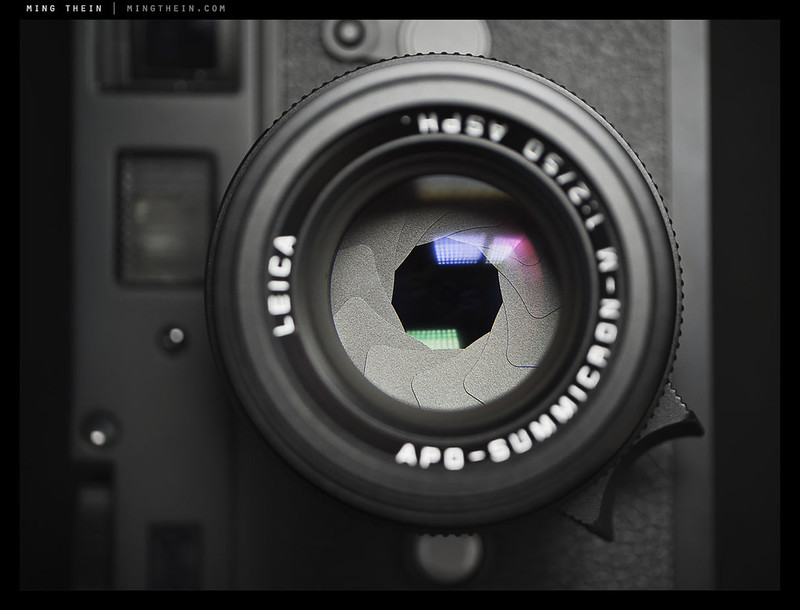
The full name is a bit of a mouthful, so I’m going to refer to it as the 50 AA from here on. The 50 AA is a complicated design: 8 elements in 5 groups, in what appears to be a heavily modified double-Gauss design with a complex rear floating aspherical group, along the lines of that used in the recent 35/1.4 ASPH FLE. Leica claims it’s their most perfect lens ever – the MTF charts certainly support this, but we will of course have to use it in the field to see if a) these claims bear out, and more importantly b) whether we can see the difference under typical shooting conditions. Perfection does come at a price – the lens’ RRP is around 7,000 USD, which is double that of the already excellent (and actually apochromatic) 50/1.4 Summilux-M ASPH.

_M9P1_L1016001 copy

Leica claims it’s the most perfect 50mm they’ve ever made – given the family lineage also includes the legendary 50/1.4 ASPH and 50/0.95 ASPH, that’s a tall order. MTF charts of this lens look flat – I don’t know if these are measured or computed, but f5.6 promises some pretty incredible resolving power and fine microcontrast structures. Let’s just say expectations were very, very high as I opened the files from this beast.

_5001734 copy

Aside from the obvious optical formula changes from the previous design (which was a simple double-Gauss with no floating or aspherical elements) – the lens has a number of physical changes despite retaining approximately the same size. Firstly, I’m pleased to see the return of the focusing tab – it makes life a lot faster, especially when you’re trying to track moving objects. Better still, it incorporates the best of both worlds and has both a wide knurled ring and the tab, which is handy when shooting in portrait orientation. Secondly, the previous telescopic hood design has been modified a bit; it telescopes but also twists to prevent it from accidentally collapsing. Finally, the cap is no longer the plastic clip-on type, but a deep metal slip-cap that makes the lens look like the 50/1.4 ASPH when it’s attached. Unfortunately, the aperture ring seems to follow recent Leica designs and is far too loose to prevent accidental changes when taken out of a bag – you have to frequently check that you’re actually shooting at the desired aperture. It’s a complaint which I have of my 35/1.4 ASPH FLE, too – how hard can it be to make slightly firmer detents?

_5001719 copy

I want to make one thing clear upfront: we’re already at the bleeding edge of diminishing returns with most lenses; your shooting discipline and rangefinder calibration are going to make far more difference to the pixel-level results than switching from the 50/1.4 ASPH to the 50 AA.

_M9P1_L1015942 copy

Performance on the M9-P
Very nearly flawless. It’s easier to talk about what’s wrong with the lens than what’s right; let’s just call it perfection minus a little bit. What are the little bits? Well, it does flare a little with strong side lighting; curiously, I don’t see this behavior shooting into the sun or point light sources. There’s also vignetting that doesn’t go away fully until f5.6, though admittedly it’s fairly minor and mostly not noticeable in everyday shooting. I really don’t have anything else to say – it’s that good.

_M9P1_L1015950 copy

_M9P1_L1015823 copy

_M9P1_L1015823 crop copy
100% crop of above image. Now this is what I call micro contrast.

Sharpness is outstanding across the frame even from wide open. There’s a very, very slight visible improvement until f4, but it’s so borderline you might as well just use the aperture for depth of field control only. Once again: if your rangefinder is properly calibrated, and you’ll want it to be for use with this lens because the focus plane transition is so sharp, you will have nothing to complain about.

_M9P1_L1015975 copy

I didn’t see any lateral chromatic aberration in any of the 500 or so test images I shots with this lens, many of then deliberately framed and composed to provoke it. There is a tiny bit of spherochromatism (bokeh fringing), but it too is fairly minor. The apochromatic nature of the lens is actually given away more by its micro contrast structure than edge CA/ fringing; let me explain why. Non apochromatic lenses focus different wavelengths of light at slightly different distances; if you cut the sensor plane through this, you’ll land up with some wavelengths being focused and others not; this is why edges aren’t perfectly defined, and why the vast majority of lenses have trouble reproducing extremely fine detail structures. The 50 AA has no such issues, by the way. Bottom line: yes, it’s apochromatic, or as near as we can tell with current sensor resolution. What would be interesting is to see how it performs on say a Sony NEX-7 body, which is somewhat notorious for not playing nicely with Leica M glass – especially in the corners.

_M9P1_L1015859 copy

Bokeh is pleasing – probably best described as neutral – it doesn’t get in the way, it isn’t distracting, but it also doesn’t dominate the image in the same way as say, a Noctilux. I did see some odd internal structure in extremely bright out of focus highlights, suggesting a formed aspherical element, but only in a couple of images. Color is also neutral and matches the palette of the modern Leica ASPH gestalt. Perhaps the best way of describing this lens is transparent. You see your subject, and not the signature of the lens – which is what I personally prefer.

_5001712 copy

Interestingly, the aperture blades – much like every other Leica lens – don’t make a perfect circle at any aperture other than wide open, yet somehow the lenses always manage to produce great bokeh. The same is true of the Noctilux 0.95, too.

_M9P1_L1015966 copy

Performance on the M-Monochrom

It is clear that this lens is capable of resolving beyond the definition of the M9 and MM sensors; even on the MM, the lens continues to be an outstanding performer wide open, though the improvement on stopping down is slightly more obvious. It delivers extremely fine micro contrast, which makes it a great B&W tool. Macro contrast – whilst great for delivering saturated color – is perhaps a little bit too high for B&W, especially if you’re shooting scenes with high native dynamic range.

_MM1_L9995346bw copy

_MM1_L9995346bw-crop copy
100% crop of image from M-Monochrom, unsharpened at f2.

_M9P1_L1015822 copy

_M9P1_L1015989 copy

The bonus bit: A comparison between the 50 AA and Zeiss ZM 2/50 Planar

Unfortunately, I don’t have a 50/1.4 ASPH or previous 50/2 Summicron-M handy for a comparison, and the Noctilux 0.95 really has a different design objective (though admittedly their prices are uncomfortably close) – so I thought the most interesting head to head comparison would be with another highly regarded 50/2 – the Zeiss ZM Planar. I tested this lens against the older 50/2 Summicron extensively before making my purchase decision, the ZM 2/50 won both optically and financially. It’s a hair sharper and doesn’t exhibit any focus shift. The coatings allow it to be about 1/2 to 2/3 stop faster than the old Summicron for a given aperture and exposure histogram, too. I also preferred the way it rendered – there was just more ‘pop’ to the micro contrast, and (personally) preferable color.

_M9P1_L1016038 copy
Reference polar bears. This image shot with the Zeiss ZM 2/50 Planar. Clicking here will get you a larger version.

_M9P1_L1016022 copy
And this one with the Leica 50/2 APO. Clicking here will get you a larger version.

A note on testing methodology: the lens was shot on a tripod-mounted M9-P at base ISO with manual (i.e. fixed) white balance, with several shots taken for the purpose of focus bracketing. However, you can still see very slight differences in calibration have resulted in a slightly different focal plane between the two lenses. However, if you look at the fine detail structure in both focus zones, you should get a fairly accurate impression of lens performance. You’re probably wondering why I didn’t do the testing on the higher-resolution M-Monochrom; simple: how else would you know if the lens was truly apochromatic or not without using a color body? Please also go by my comments rather than the images (which are for demonstration purposes) – I’ve reviewed and examined far more full-size, uncompressed images on my PC than I can post here.

50AAvsZM50planar-f2 sharpn copy (deleted 4fbb42a4-4c409-365ac916)
100% comparison screenshot at f2. Original (100%) size

50AAvsZM50planar-f8 sharpness copy
And again at f8. Original size

Focus plane differences aside, (and this is a prime example of how rangefinder calibration can seriously affect results) there are a lot of differences – and all of them in favor of the 50 AA. Neither one quite gets the color right – the 50 AA is too cool, and the Zeiss is too warm and saturated. What I previously thought was excellent and three-dimensional micro contrast (look at Bob’s scarf) on the Zeiss frankly now looks a little, well, soft (look at the label that wraps around the edge of the cigar box). The 50 AA has better bokeh, too; there’s a hint of double-edging and more spherochromatism on the Zeiss.

50AAvsZM50planar-f8 microcontrast copy
Microcontrast, 100% crop at f8. Original size

50AAvsZM50planar-f2 bokeh copy
100% crop of bokeh at f2. Original size

50AAvsZM50planar-f8 bokeh copy
And again at f8. Original size

There are two pieces of good news, however – firstly, the differences by f8 are negligible; secondly, in actual shooting, the two lenses are a lot closer than this appears. Your focusing accuracy is going to make far more difference than the MTF charts. Secondly, both lenses are already at an excellent starting point – though the relative differences may be very noticeable here, I think perhaps comparing these to a Nikon 50/1.8 D might put things into perspective somewhat.

_M9P1_L1015875 copy

_M9P1_L1015875 crop copy
100% crop of above image. Can you say, ‘detail’?

Remember my earlier article on T stops and f stops? The 50 AA meters the same as the older 50 Summicron, which is to say the Zeiss is 1/2 to 2/3 stop faster still. What this means in reality is that you can use the same aperture, get the same exposure histogram, but use a shutter speed that’s 50% to 75% faster on the Zeiss. It matters because you’re effectively getting more light into the camera, which can be critical especially in marginal situations.

_M9P1_L1015862 copy

The 50 AA is undoubtedly the best 50mm lens I’ve ever tested by a small, but very clear margin. I’d love to have something this good to make the most of the D800E’s resolution, but the only thing that might come close is the Zeiss 2/50 Makro-Planar or Coastal Optics 60/4 APO UV-VIS-IR. The former has a very, very short focus throw from about 1m to infinity, which makes it tricky to use as an everyday lens; the latter is limited to f4. The only problem I have with the 50 AA is the price – I don’t know how this can be priced at the same level as much more complicated optical designs like the 21/1.4 Summilux ASPH; one can only hope it’s the degree of quality control involved (and I’ve definitely seen clear sample variation amongst even the 50/1.4 ASPH and 35/1.4 ASPH FLE lenses.). It’s also clear that the resolving power of this lens goes far beyond the current M body sensors, and perhaps reading a little deeper, says something about the resolution and pixel density of future M-mount cameras. Having said all of that – I’ve been hugely impressed with the results I’ve seen out of this lens. If you have the money, and must have the best, then this is the 50mm for you.

Come back in two days for the final part of the Leica May 10 series: how much resolution does the M-Monochrom really have?

The Leica 50/2 APO-Summicron-M ASPH is available here from B&H orAmazon.

____________

Visit our Teaching Store to up your photographic game – including Photoshop Workflow DVDs and customized Email School of Photography; or go mobile with the Photography Compendium for iPad. You can also get your gear from B&H and Amazon. Prices are the same as normal, however a small portion of your purchase value is referred back to me. Thanks!

Don’t forget to like us on Facebook and join the reader Flickr group!

appstorebadge

Images and content copyright Ming Thein | mingthein.com 2012 onwards. All rights reserved

_M9P1_L1015873 copy