On Assignment: The contents of my bag

_5A00585 copy

I thought you may all be curious to see what I’m bringing to Switzerland for my current assignment. Let’s just say there’s a hell of a lot of stuff here:

Primary system:
– Nikon D800E
– AFS 28/1.8G
– AFS 60/2.8 G Micro
– PCE 85/2.8 Micro
– ZM 28/2.8 plus Leica M to Nikon F adaptor

Backup system:
– Olympus OM-D with HLD-6 grip – I plan to do some walking around too, and I don’t want to carry the D800E.
– Olympus ZD 12/2
– Olympus 45/1.8
– Panasonic 20/1.7 G
– Panasonic Leica 45/2.8 Macro
– That little clip on flash thingy to trigger the SB900s in SU4 mode
– Nikon G to M4/3 adaptor

_5A00587 copy

Lighting:
– Nikon SB900 x3
– Custom made perspex diffuser and case, various cards, papers and laminates for backdrops and diffusion.
– Manfrotto 5001B compact light stands plus heads and flash stands x3

Support
– Gitzo GT1542T Traveller 6X carbon fiber tripod
– Manfrotto 468RC0 Hydrostat ball head
– Manfrotto micro positioning rail

IT
– Apple MacBook Air 11″
– Apple iPhone 4
– Western Digital MyPassport 1TB 2.5″ USB drive for backups
– Sandisk Extreme SD/CF USB card reader
– Chargers and universal adaptors

Other accessories:
– Spare batteries and chargers for both cameras
– 8 sets of Sanyo Eneloop AA batteries for the SB9000s
– Two sets of Kenko Pro DG extension tubes
– Adaptor plugs and multi strip
– SD cards; Sandisk Extreme HD 32 GB x4
– MAHA C801D fast AA charger
– Nikon SC-31IR flash deflector panel for D800E built in
– Rocket air blower
– Soft white cloths
– Blu tack
– Duct tape
– Magic tape (for removing dust)
– WhiBal cards
– Small lens pouches

Bags
– Think Tank Airport International v1
– Billingham Hadley Pro, without the internal dividers but with some small lens pouches and a camera wrap, packed into my check-in luggage
– Manfrotto MBAG80P for light stands and tripod

_5A00588 copy

Here’s most of it packed in. What you don’t see is the diffuser case, which is quite enormous and wouldn’t fit into the picture…

____________

Visit our Teaching Store to up your photographic game – including Photoshop Workflow DVDs and customized Email School of Photography; or go mobile with the Photography Compendium for iPad. You can also get your gear from B&H and Amazon. Prices are the same as normal, however a small portion of your purchase value is referred back to me. Thanks!

Don’t forget to like us on Facebook and join the reader Flickr group!

appstorebadge

Images and content copyright Ming Thein | mingthein.com 2012 onwards. All rights reserved
A day in the life of…

For the loyal readers who’ve been with me from the start of this blog, I thought I’d give you all a quick update on how the transition to full time pro is going a few months in. In short: I’m enjoying it, but boy is it hard work. Even during the dark depths of my management consulting career, I don’t think I worked such long hours – and there’s no goof off time either, because you’re always on your own clock. I won’t lie and say that it’s all rosy; there are always days I wake up and worry about the pipeline, or collections, or sudden changes, or even being faced with a challenge that I can’t shoot – but I also think the reality is that these anxieties are normal, and if you don’t have them, then something is wrong (or about to go wrong) because one is being overconfident.

For the curious, here’s how my typical day looks – in this case, I’m using my schedule from 17 May, because I happened to flip to that page in my planner and can still read most of the handwriting:

7.00am: Wake up, hit snooze again.

7.15am: Alarm goes off again. I’m in that half-asleep-half-awake state thinking about what I need to get done for the day. I finally get out of bed when either antsyness (is that even a word?) overcomes inertia, or my wife starts getting ready for work.

7.20am: Poke the polar bear, who’s still sleeping.

7.30am: I’m at my desk and dealing with email. Thanks to the internet, messages arrive at all hours – a quiet day will see perhaps 20 emails when I wake up, over 50 on a busy day. And that’s having cleared out my email just before I went to bed earlier. Some stuff is from clients, some stuff is blog comments, some stuff is reader questions. And there are personal emails, offers for credit cards and personal enhancement pills buried in there somewhere too usually.

8.30am: I’m usually done with replying messages by now. Time to put an upload onto Flickr, and sort things into groups.

8.45am: POTD goes up onto the site, and any amendments that other articles require (I work about a month in advance) are made.

9.00am: Leave for breakfast with a client to pick up a watch to shoot.

10.00am: Back in the studio, begin setup of lighting for the shoot.

10.05am: Clean watch. Microfiber cloths to polish, and Rodico watchmakers’ putty to remove grit and dust from the cracks and crevices.

10.15am: Still cleaning watch. The more cleaning you do upfront, the easier your job is later in the retouching.

10.30am: Finally done cleaning watch; now handled only with microfiber gloves and a filtered blower is used between position changes to remove as much dust as possible.

11.30am: A break for the flashes because they’re starting to overheat; time for new batteries and a drink for the photographer. Download cards onto computer and run a backup.

12.45pm: Finish shooting, download cards again and run a backup. Charge all batteries, clean equipment and stow in dry cabinet. With ambient RH of anywhere between 65 and 90%, you really don’t want to leave anything out and run the risk of a fungus growing on it.

12.50pm: Burn disc of rough preview jpegs for the client to pick from. This was a rush job because it’s a foreign client that happens to be in town, otherwise I’d normally do things via Dropbox.

1.30pm: Lunch with client, delivery of rough images on CD, return watch

3.00pm: Quick coffee with a friend – the coffee is more for my benefit at this point – we share a mutual client (he’s a lawyer)

3.30pm: A serendipitous phone call reveals that another potential client is not only in town, but within the same 500m radius; I manage to squeeze in an appointment for 4.30. Rush back to the studio to get the iPad.

4.20pm: Arrive at meeting location, wait a little; find nearest and coldest air conditioning vent to cool down after rushing.

4.30pm: I’ve got a 15 minute window to pitch; it’s another watch client, so I take him to see the exhibition which fortunately still happens to be running. Turns out he’s seen it, liked the work, but didn’t realize I was the photographer. Note to self: ensure proper signage in future.

4.45pm: We go our separate ways, and I return to the studio/home/office.

5.00pm: Clear email and messages again.

5.30pm: Write an email to a prospective new agent-representative in Singapore; safeguarding the pipeline of future work is always the number one concern for any commercial photographer.

6.00pm: Call another client in Switzerland to follow up retouching details and payment; it’s a good time to call because they’ve had their morning coffee and aren’t quite thinking about lunch yet.

7.00pm: Some light browsing to see what’s news in the world of photography.

7.30pm: Time to think about dinner and spend time with the wife, who’s now arrived home and been patiently waiting for me to get off the damn computer.

9.30pm: Back online again to clear yet more email and write another post; by the time I’m done laying everything out, proof reading, adding images and so on, I’m beat.

11.30pm: Schedule post, look up my stats for the day (ooh, just noticed the site must have crossed the quarter million hit mark sometime in the last few days) and check the to-do list for tomorrow. Realize that on the to do list is ‘buy diary’ – I’m relying on a combination of memory, iPhone reminders and bits of paper, and it’s utterly useless for longer term scheduling.

11.45pm: Climb into bed, try to read a little before sleep; manage about four pages before dozing off. It’s bad if it’s an exciting book, because then I might read until 1-2am and not get enough sleep for the next day.

So, who wants my job? 😛 MT

____________

Visit our Teaching Store to up your photographic game – including Photoshop Workflow DVDs and customized Email School of Photography; or go mobile with the Photography Compendium for iPad. You can also get your gear from B&H and Amazon. Prices are the same as normal, however a small portion of your purchase value is referred back to me. Thanks!

Don’t forget to like us on Facebook and join the reader Flickr group!

appstorebadge

Images and content copyright Ming Thein | mingthein.com 2012 onwards. All rights reserved

Photoessay: Pedro Miguel Schiaffino from Malabar, Lima

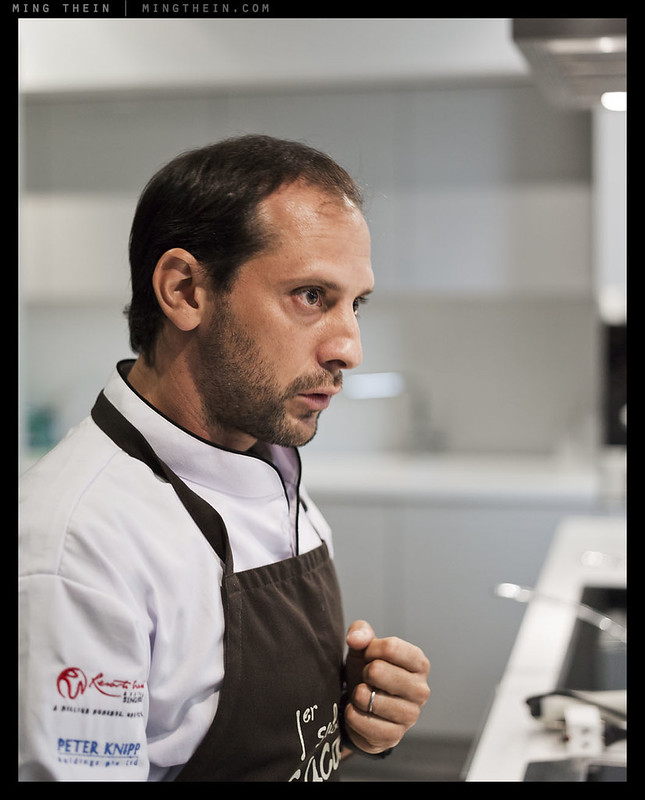
I had the opportunity recently to do some teaching (food photography, not cooking of course) with noted Peruvian chef Pedro Miguel Schiaffino from Ristorante Malabar, Lima at the World Gourmet Summit in Singapore. First off – he’s one of the nicest people I’ve met, with completely zero ego; that’s pretty darn unusual for a chef. Secondly, he has a hugely infectious enthusiasm for the native foods of Peru, most of which he has to trek into the jungle to find. Pedro says he trains locals to recognize edible plants and roots, but they subsequently tend to leave for food distributors who can pay more; to this he shrugs, and rationalizes it against anything that raises awareness of his country’s produce and helps the locals find regular employment being a good thing. As I said, one of the nicest people I’ve met. Oh, and he makes the most amazing ceviche, too. Enjoy, vicariously. MT

This set shot with a Leica S2 and 75/2.5 Summarit (people photos) and a Leica D-Lux 5 (food photos.)

_S21_L1008294 copy

_S21_L1008303 copy

_S21_L1008348 copy

_S21_L1008338 copy

_S21_L1008401 copy

_DL5T_L1000709 copy
Ceviche, with a domestic Peruvian speciality algae – the green blobs. Difficult to describe the taste; a little like a gelatinized gherkin but not as sour.

_DL5T_L1000726 copy

_DL5T_L1000714 copy
What looks like rocks…

_DL5T_L1000719 copy
…are actually Peruvian root vegetables, meticulously tourneed, and covered in a local edible river clay mix that the natives use to aid digestion. Although the clay itself tastes like…well, dirt, it lends an interesting semi-roasted texture to the skin of the vegetables. I’m sure it probably gives you your RDI for most minerals, too.

_DL5T_L1000727 copy
In their natural habitat, with sous-vided lamb finished on the pan. Pedro blends modern techniques – sous vide for instance – with traditional ingredients, like the clay.

_DL5T_L1000732 copy

_DL5T_L1000735 copy
Dessert. Pisco sour sorbet, stewed melon and various flowers.

_DL5T_L1000740 copy

_S21_L1008406 copy
Talking with the students after the meal.

The iPhone as a camera

IMG_1310b copy
Angles.

I admit to being one of the skeptics who didn’t believe that anything that wasn’t designed primarily as a camera would be able to function in a worthwhile capacity as one – I remember my first camera phone having all of VGA resolution (a Nokia 6600) and not being very much good under any conditions. In fact, the thing didn’t even have autofocus, much less any sort of manual adjustments. Successive phones thereafter all came with cameras of some sort, mostly held at the 1.3 megapixel level with sensors about the size of this full stop. In the meantime, I was shooting with APS-C DSLRs – no comparison!

IMG_0940b copy
Rain

But the relentless pace of miniaturization eventually delivered a sensor of sufficient quality and resolution, coupled with a decent enough optical system, that I put aside my biases for long enough to give one a decent try. That was the iPhone 3GS – it had a 3MP camera with autofocus; tap to select the focus point and lock exposure. A little, bit like weighted spot metering. I got a decent image or two out of that.

IMG_1319bw copy
The waiters

The iPhone 4 was a revelation, however. Not only was the sensor and optics greatly improved, we finally got a decent field of view – my favorite 28mm! Still tap to focus and expose, with no provision for adjusting any controls anywhere. Despite all that, it was (and is) possible to get some pretty good shots out of the camera – especially considering it’s a phone first, small computer second, and camera somewhere around a distant third.

IMG_1665b copy
Filling stop

In other ways though, it shows. Despite the increasing complexity and controllability of competitors’ offerings, Apple decided to keep it idiot-proof and deny the iPhone user any sort of exposure control other than the pseudo-spot meter. Nokia released a 41MP sensor that used binning to generate some of the most amazing 8MP images I’ve seen from a small sensor camera – let alone a phone – and Apple just quietly went to 8MP, and fiddled a bit with the FOV again, so it’s probably closer to 30 or 32mm in the 4S than the previous 28mm.

IMG_1446b copy
Shards

I don’t have a 4S, nor do I intend to pay the Apple ‘upgrade tax’ every year to buy one. The iPhone is a great piece of technology, but I’m entirely happy with mine until it breaks, or the new model actually offers something I want that I can’t currently have. And only then will I think about buying another one. (From a commercial point of view, I actually find it pretty amazing that they can turn a $800 precision device into a piece of fast moving consumer electronics.)

IMG_1281bw copy
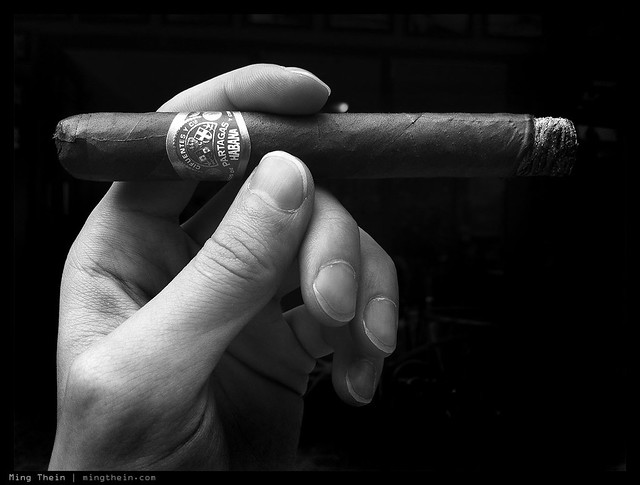
Partagas

What the iPhone lacks in controllability it makes up for in development possibilities – just so long as you stay within Apple’s limits. I still remember the app which had a shortcut option to put the camera shutter onto one of the volume release buttons – it got pulled, only for Apple to subsequently add it as a system option to the latest version of iOS. To be honest though, I’ve tried most of the popular photo apps and find them a bit cheesy. Instagram, Hipstamatic and Camera+ are the prime offenders: use the app, and your images look the same as everybody else’s who used the app – what’s the point of photography if you’re going to produce the same work as the next guy? They might as well forgo the camera and just put in a library of random images that appears whenever you press the shutter instead.

IMG_0838b copy
Auckland marina sunset

There are some good apps, however – PhotoForge is one of them. It comes much closer to being Photoshop lite than Photoshop Mobile does; that I find pretty amazing. Still, I wouldn’t do any serious editing work on that because it lacks the fine control of the real desktop version.

IMG_0926b copy
Dew on leaf in playground

I want to talk about three more things before I close.

Firstly, real world limitations:
– You can’t control white balance. This is the biggest of them all, to me – especially when the iPhone 4 does a pretty poor job at deciding what color something is. Shade is much too cool, and incandescent is much too warm. And worse still, it tends to blow out the channels so you have no hope in hell of recovering any tonal information later.
– You can only control exposure to a certain degree, and that’s linked to focus point. Generally, this is okay because it’s how spot metering works – you expose for your subject, which you also obviously focus on. However, I find again that the latitude of adjustment for exposure is limited – perhaps because the camera has an electronic shutter only – so sometimes it can’t give you a fast enough shutter speed, or a slow enough one. It would actually be nice to know what exposure parameters the camera chose, too.
– You can’t control the output JPEG parameters. All you get is Disneyland color mode – that’s it. Again, once a channel goes, so does any hope of recovering tonal information.
– Speed. Focusing speed, shooting speed and shutter lag are all slow – the 4S improves on this slightly, but still feels unresponsive compared to a good compact like the Ricoh GR-Digital III or IV. Realistically, that means you’re not going to be shooting anything moving, unless you prefocus.
– Tap to shoot. The lack of a physical shutter button means awkward hand positions and ensuing camera shake while trying to poke the button on the screen. Sure, iOS5 gives you the option of using one of the volume buttons, but it isn’t a solution – you still need to touch the screen to focus.

IMG_0912bw copy
Relax.

Secondly, advantages and strengths:
– It’s always there. We always carry our phones, and even if I didn’t, the iPhone 4 is small enough and sleek enough that I wouldn’t notice it in my pocket.
– The image quality is finally good enough. Hell, even Getty Images thinks so – I’ve got photos in the library that were shot with an iPhone 4.
– It’s silent. Thankfully that annoyingly cheesy shutter sound can be silenced by putting the phone in vibrate mode; or you could just stick your finger over the speaker opening.
– Connectivity. Sometimes, you need to share an image – something stupid, something important, something for information only. And you can’t do that easily with a camera that isn’t also internet-connected.

IMG_1663bw copy
Just another KL traffic jam

Finally, possible improvements for a future version, bearing in mind the original Apple gestalt for simplicity:
– More latitude for auto white balance and the touch-spot meter
– Show us what the exposure is! I want to know in advance if it’s too dark or will be grainy etc.
– Two more manual settings: ISO, and image output parameters.
– RAW files (we can dream, I suppose). I still have to run the jpegs through photoshop to pass muster, so I might as well start from a better base. Sorry Apple, there’s just no way you can develop one set of color/ tone/ sharpening settings that are going to work under all situations.
– Two stage shutter button, or if Jonathon Ive lost a few points of his bonus percentage for each button he added, then make both of the volume buttons do double duty: one to AF and lock exposure, and the other to shoot.
– Put the damn camera in the middle of the phone, at least in a position where you’re not likely to stick your hand into it if held in landscape orientation. The design of the phone is superb, but it’s way too easy to stick your finger into the lens.
– Better low light performance (taken as given)
– More speed! (taken as given)

IMG_1209bw copy
The Interrogator, or Behind the two way glass

In conclusion, I use the iPhone a lot as a camera because of one reason and one reason only: it’s the one I know I always have with me. (And even if I did have another camera, what would I use to take pictures of the camera? photographer’s joke 😉 MT

IMG_0682b copy
Magritte strikes again

____________

Visit our Teaching Store to up your photographic game – including Photoshop Workflow DVDs and customized Email School of Photography; or go mobile with the Photography Compendium for iPad. You can also get your gear from B&H and Amazon. Prices are the same as normal, however a small portion of your purchase value is referred back to me. Thanks!

Don’t forget to like us on Facebook and join the reader Flickr group!

appstorebadge

Images and content copyright Ming Thein | mingthein.com 2012 onwards. All rights reserved

Photoessay: Burlesque party

A continuation of the sequences theme from a few weeks ago; let’s just say this was one of the more fun parties I attended. And being a party, it’s a social occasion; I certainly wasn’t working, but that didn’t prevent me from packing some pocket firepower in case photographic opportunities presented themselves, or I simply got bored with the conversation. (My wife is a long-suffering social and conversational martyr when it comes to me, photography, vacations and parties – thanks Nadiah!) Yes, it was dark, and there is motion blur because I ran out of apertures and shutter speeds (not to mention having trouble focusing on the rapidly moving dancers) – but I definitely think the motion blur adds to the action and slight sense of chaotic fun. MT

This series shot with an Olympus E-PM1 Pen Mini and Panasonic 20/1.7 G.

_PM03612 copy

_PM03580 copy

_PM03592 copy

_PM03625 copy

_PM03594 copy

_PM03589 copy

Leica M rangefinder calibration service

_D90_DSC4448 copy

I’ve had a number of enquiries about focus precision, rangefinder calibration and adjustment etc. in the last couple of weeks – I suppose it’s because of the need for precision highlighted by the Monochrom’s resolution and 50 APO’s resolving power.

I had the same problem myself in 2009 when shooting with M8s; new lenses would require calibration adjustments and the RF alignment would drift over time with frequent mounting and unmounting. A return trip to Solms for the entire kit of two bodies and several lenses would of course be impractical (both expensive and hugely time consuming), so I learned how to do it myself.

For Leica M shooters in Kuala Lumpur, I offer a rangefinder calibration service for the digital M8/ M9 bodies. It takes an hour, and you pick which lens you would like the body calibrated for – I recommend either your most used lens, or your shallowest DOF one. It is possible to have all bodies calibrated for all lenses, but this will require a long and expensive German holiday for your entire kit as there’s some lens disassembly involved to realign the helicoids…

The adjustment leaves no trace and will therefore not affect your warranty.

Please send me an email if you’d like to make an appointment or enquire about this service. MT

Video: A B&W workflow tutorial

After the series of articles on color and B&W – and of course the M-Monochrom review – I got a huge number of emails asking about my workflow for B&W conversion. I originally tried to put this post into a conventional text and image format, but gave up shortly after I realized it would be impossible. Instead, have a video! I don’t claim to be any good at video production (forays into this are are another topic for another day), but I think this should give you a good idea of how it all comes together. Excuse the lousy sound, that bit I still haven’t quite gotten figured out yet. I suppose I need some collar mics or something – the equipment buying never ends…

Anyway, enjoy the video. MT


____________

Visit our Teaching Store to up your photographic game – including Photoshop Workflow DVDs and customized Email School of Photography; or go mobile with the Photography Compendium for iPad. You can also get your gear from B&H and Amazon. Prices are the same as normal, however a small portion of your purchase value is referred back to me. Thanks!

Don’t forget to like us on Facebook and join the reader Flickr group!

appstorebadge

Images and content copyright Ming Thein | mingthein.com 2012 onwards. All rights reserved

Shooting professionally with the Olympus OM-D E-M5

_5003127%20copy
Rice. Olympus OM-D and Panasonic Leica 45/2.8 Macro-Elmarit

I had an interesting food assignment recently, which was challenging for several reasons – not least the location:

_5002420 copy
Doesn’t look so bad? Look again:

_5002274 copy

Turns out this particular client’s restaurant wasn’t ready; the assignment was concept food for the menu, website and marketing materials for a new local chain. So they borrowed the (primitive) kitchen of another friend, who happened to run a small cafe in an office-building-cum-training-center-cum-community-college. The only place they had for me to shoot that was both close to the kitchen and powered (for the lights) was literally off to the side of a hallway! I’ve never thought of photography as performance art before, but judging by the crowds that stopped by to rubberneck throughout the two days, I should probably have charged admission. To be honest though, I was more worried about people tripping over the cables or moving lights, or worse still, equipment going missing. (Fortunately, none of that happened – thanks in no small part to the wonders of duct tape.)

IMG_1850 copy
Setup shot – Apple iPhone 4

In the past, I would have done this shoot with a Nikon FX body, macro lens, tilt-shift, and a few speedlights and umbrellas. After much experimentation with LED panels for both casual work and teaching – I’ve come to the conclusion they’re a much better option for food photography, both enabling you to see straight away the light effects, plus minimize the effects of heat on food – especially important with things like ice cream or raw fish.

I don’t have any questions about the image quality of the OM-D – at base ISO, it’s better than the D700 – but what did concern me was the client reaction to me using a ‘small’ camera, given their expectations and my rates. I even packed a D700 and full set of lenses just in case. However, so far those concerns have been completely unfounded. I’ve mixed in a number of images from the OM-D with a recent submission to a watch client, and they haven’t said anything negative (the bulk of the job was shot with a D800E; the OM-D images were upsized to 25MP) – however, they didn’t see me shoot as I wasn’t working on location.

Fortunately those fears turned out to be unfounded. There was no negative reaction from the client to the camera or image quality. (Though to be on the safe side, I added the HLD-6 to bulk things out a bit – and give me some more battery life.) In fact, I have to say I’m extremely impressed with the color reproduction of the OM-D – after shooting a WhiBal card under the LED panels to lock in the white balance, the images needed almost zero color correction in ACR – this is something I’ve never experienced before. I think the combination of high CRI LED panels and the OM-D for food photography is a revelation, and not having to do extensive color rebalancing work to achieve perfect color saves a huge amount of processing time afterwards. The extended DOF for a given FOV/ aperture combination helped too; f8 was about as low as I could go with the LED panels and still manage 1/90s or so at base ISO. I did bring a tripod along – my shiny new Gitzo GT1542 Traveller which I haven’t had a chance to use yet – but didn’t need it due to the image stabilization and reasonably high shutter speeds.

_5002312 copy
More rice. Olympus OM-D and Panasonic Leica 45/2.8 Macro-Elmarit

A note on the gear used – one OM-D body with HLD-6; the Panasonic Leica 45/2.8 Macro-Elmarit for the majority of the shots, with the Voigtlander 25/0.95 (the near focus ability is extremely useful for food photography, but I’m not so enamored with the wide open performance – review coming soon) for the wider shots; I brought the 12/2 and 45/1.8 just in case, but didn’t land up using either. A D700, 24/1.4, 60/2.8 G Macro and 85/2.8 PCE rode shotgun as backup. In future, I think I’m just going to bring a pair of OM-D bodies and save a lot of space and weight. Battery life on the OM-D was pretty good – not as good as the Nikons (the D700 usually gets me around 700-800 shots per charge with the commander flash firing, or 1000+ with no flash; the D800E is good for 2000+) – but a respectable 650-700 per charge with heavy chimping. One slightly concerning behavior I did see with the OM-D was an occasional lockup – it seems that if I review and zoom in fairly soon after taking the shot, the camera sometimes freezes on zooming out again. Popping the battery from the grip is the only way to solve this. I only see this behavior with the battery grip, and it’s not always repeatable. Hmm. Fortunately, it doesn’t eat shots or corrupt things. I will be following up with Olympus in due course…probably after I’m done processing this assignment, and after next week’s assignment in Geneva.

All in all – a positive experience. I was surprised by how much less fatiguing using the OM-D is for studio work; I always thought I didn’t really notice the weight of a full sized DSLR, but I guess it turns out I do. Even with the HLD-6 and heaviest Voigtlander 25/0.95 – it weighs in at just over 1kg instead of the 1.6kg or so for a D700/D800 and 85 PCE; more if I’m using the vertical grip for those cameras.

Now, time to decide if my second body should be black or silver…MT

A note for all of those complaining my previous images were over sharpened – I think I’ve fixed the problem, but please let me know if they still look off. I can’t do anything about the images already in the system, so there may still be a few that I post in the future that appear a little over sharpened.

____________

Visit our Teaching Store to up your photographic game – including Photoshop Workflow DVDs and customized Email School of Photography; or go mobile with the Photography Compendium for iPad. You can also get your gear from B&H and Amazon. Prices are the same as normal, however a small portion of your purchase value is referred back to me. Thanks!

Don’t forget to like us on Facebook and join the reader Flickr group!

appstorebadge

Images and content copyright Ming Thein | mingthein.com 2012 onwards. All rights reserved

Photessay: Thean Hou temple by night

Thean Hou temple is a famous Buddhist location just outside Kuala Lumpur, popular as a place of worship during the new year and various lunar festivals. It’s also home to various martial arts groups. The temple belongs to the Selangor and Federal Territory Hainanese association, and was constructed from 1981 with funds donated by the community.

This set shot with an Olympus E-PM1 Pen Mini.

_PM00711 copy

_PM00719 copy

_PM00703 copy

_PM00720 copy

_PM00784 copy

_PM00776 copy

How serious do you want to get?

At some point, every enthusiast photographer is going to want an upgrade. It’s a natural consequence of human society; more and newer is better. Since money doesn’t necessarily correlate to ability – in fact, it’s frequently the complete opposite situation – the people who’ve bought the best and latest gear generally aren’t the best photographers. In fact, I think a solid argument can be made that if you are very committed and passionate about your hobby, then you’ll find ways to make do without resorting to technology.

Advance warning: this article is as much about individual soul searching as it is about gear lust. Many of you will probably disagree with what I have to say, or find the truths a little uncomfortable; you of course don’t have to listen to me, but you might well find doing so unburdens you and allows you to develop even more as a photographer. Why am I saying this? Because I went through the process myself, and have to make a conscious effort to stop myself from falling into the gear trap. (It’s actually a lot worse when you’re a pro because you can justify buying anything as ‘work related’ and a tax-deductible expense.)

Notice the question I asked was ‘how serious do you want to get?’ not ‘how serious are you?’. There’s a difference: the former is aspirational, and the latter is slightly insulting, specifically in the implied stagnation and doubt of one’s ability.

Rule Number One: don’t confuse need and want.

There’s nothing wrong with wanting something. It’s what makes us human, in many ways. But don’t think you need it. Having a D800 will not make you a better photographer than D700. In fact, it might well make your images worse if you lack the discipline to use it properly. But if you desire one, and that’s all there is to it, then go ahead. If the ownership experiences gives you pleasure, and you’re happy carrying the weight around, then who’s going to stop you? These types of purchases tend to be accompanied by positive personal emotions.

Need is different: you’re going to find it difficult to do product photography without lighting gear. That’s a need, if the situation calls for it. I wouldn’t argue any other way. These types of purchases often feel like paying tax: we do it because we have to, not because we want to.

This brings me on to Rule Number Two: only buy something if you know you’ve exhausted the limits of your equipment.

There are so many advantages here: you’ll buy exactly what you need. You won’t waste money on trying things that ‘might’ be useful. You will actively seek the skillset required to make the most of the new acquisition.

Rule Number Three: learn to use what you’ve got. This one is a biggie. The number of people who keep buying bigger and faster lenses and cameras thinking that it’s going to solve basic compositional problems never ceases to amaze me. Fps and bokeh are tools and enablers, not a crutch for compositional imbalance! Yes, the ‘Photoshop tax’ is painful, but if you think about it, not unreasonable. I use photoshop for every single image I shoot. There is no other piece of equipment that falls into this category, yet some of the other tools I own cost far more. How is this unreasonable? I look at it as cheaper than having a darkroom, or paying somebody to develop films for you. Furthermore, signing up for a decent course or educational program is going to cost less than a new camera, but teach you far, far more. Buying a professional camera without understanding photography is like driving a Ferrari with traction control off in the rain: you can go fast, kinda wing it, probably hold it together most of the time, but sooner or later, you’re going to crash in a big, messy way.

This brings us around full circle. I don’t define seriousness in photography as whether you make your living from it or not; there are plenty of ‘pros’ who make big money but don’t really care about the output – so long as it’s about 90% there, the clients can’t tell the difference. Even more shockingly, I was told this in person, by more than one person whose fees are rather high. Similarly, there are amateurs who are outstandingly good photographers – probably without the commercial inclination or personal interest in making a living out of it – but their shooting discipline and workflow shows incredible attention to detail, even though very few people (if any) see their images.

Rather, seriousness is probably closer to how much of a sacrifice you’re willing to make; this comes in many forms. Cost. Weight of equipment. Time spent processing, which could be spent on other things. Sleep sacrificed for that perfect sunrise or sunset. Personal security, to get the shot in a dangerous area. Photographers who try to capture things they cannot control – think photojournalists and wildlife shooters – rank pretty darn high on the seriousness ladder.

I think it’s very important to know where this boundary lies personally. Like every other wildlife photographer, I once had aspirations to shoot for National Geographic; the reality is that after a bit more research into what they do while on assignment; I don’t think I’d be happy with that kind of life; sacrifices are high. But on the opposite side of the coin, I’m willing to put up with PC lenses, tripods, focusing racks etc. in order to eke out a tiny bit more image quality for my watch photography – which I don’t think many people would bother with.

Perhaps another definition of the spectrum is whether you’d go out of your way to get the shot or not: a serious photographer would either go far, far out of their way and plan specifically to get that one image; a not-serious one would be more opportunistic and just make causal images as and when the opportunity arises.

Knowing where you stand on this continuum  – enables you to make decisions without that slight discomfort and doubt that you’re compromising on other things at the expense of photography – but without really knowing why. It’s a lot easier to be happy about the choice to carry 20kg of equipment on holiday because you know that you aim to get some very specific shots that can only be done with that equipment; as opposed to bringing-it-along-because-you-bought-all-of-it-already-because-it-made-you-look-like-a-pro-and-now-you-should-probably-use-it. Similarly, you won’t feel bad about missing that amazing sunset your 20kg-toting friend got because he woke up at 5am, and you were hungover after partying the night before – but you know how to make a decent shot with your mirrorless camera when the opportunity arises, even if you don’t actively go out of your way to look for it.

That liberation brings happiness and contentment. Very simply, that makes it a hell of a lot easier to enjoy what you do; the fact that you’re here and reading means you’ve got a choice. And given that choice, would you want to do anything for any other reason? MT

____________

Visit our Teaching Store to up your photographic game – including Photoshop Workflow DVDs and customized Email School of Photography; or go mobile with the Photography Compendium for iPad. You can also get your gear from B&H and Amazon. Prices are the same as normal, however a small portion of your purchase value is referred back to me. Thanks!

Don’t forget to like us on Facebook and join the reader Flickr group!

appstorebadge

Images and content copyright Ming Thein | mingthein.com 2012 onwards. All rights reserved