Photoessay: Kowloon in color

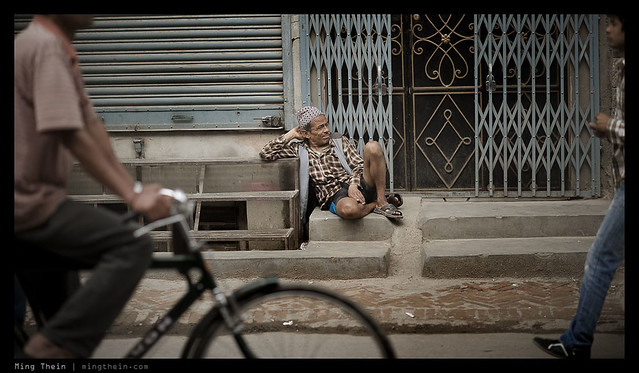
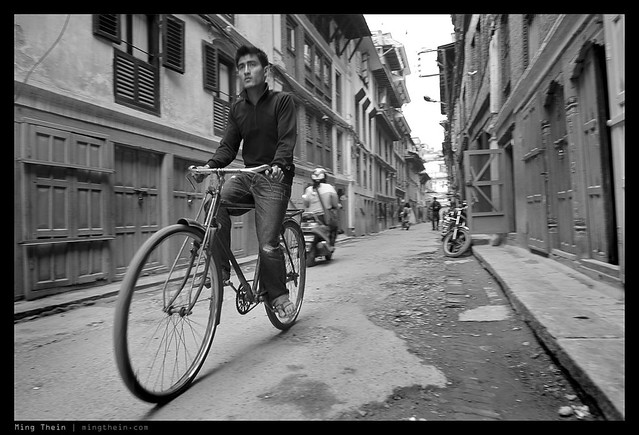
Shot on a particularly rainy night in Kowloon, post-typhoon with a Leica M9-P and Zeiss ZM 28/2.8. Surprisingly, both functioned fine despite the moisture and humidity. I must be one of the few strange photographers who actually like shooting in the rain – it’s not masochism, despite what it might appear as. Three simple reasons: one, there’s a lot more texture and color from the water, reflections and umbrellas; two, the light is a bit more diffuse; three, nobody pays you any attention – everybody is simply too busy trying to keep dry. And this makes street photography significantly easier. MT

_M9P2_L1000628 copy

_M9P2_L1000463 copy

_M9P2_L1000492 copy

_M9P2_L1000609 copy

_M9P2_L1000567 copy

_M9P2_L1000554 copy

_M9P2_L1000518 copy

_M9P2_L1000490 copy

_m9p2_l1000481 copy

_M9P2_L1000473 copy

____________

Enter the August 2012 competition: Compact Challenge – here!

If you enjoyed this post, please consider supporting the site via Paypal ([email protected]); Ming Thein’s Email School of Photography – learn exactly what you want to learn, when you want to learn it or learn how to achieve a similar look with our Photoshop workflow DVDs.  You can also get your gear from Amazon.com via this referral link.  Prices are the same as normal, however a small portion of your purchase value is referred back to me. Thanks!

Don’t forget to like us on Facebook and join the Flickr group!

My thought process when shooting

One of the more common questions I’ve been asked recently (aside from what my Photoshop workflow looks like) is what my thought process is when shooting. This basically breaks down into two streams – am I in control of the situation photographically, or not?

By that I don’t mean whether I’m out of my depth or not; it’s about whether I have the ability to direct exactly the elements in my frame. The order doesn’t mean that one item is hugely prioritized over another; it isn’t. It’s more a case of if I have no choice,then which comes first?

In a controlled setting – studio, tripod, portrait, macro, landscape etc
Lighting
Perspective
Framing/ composition
Subject positioning
Reflections/ specular highlights
Edges
Exposure
Focus

The first things you’ll notice is that the subject doesn’t even enter into the equation – why? Well, it might as well be taken as given the there will be a clear subject to the image if I’m going to bother setting up lights to photograph it! This too, is the main reason why one would work in a controlled setting – the ability to perfectly light your subject, as well as control the composition precisely. You’ve got all the time in the world to perfect focus, and the exposure you select falls out of your lighting choices; this is why some minutae like reflections and subject positioning take precedence: simply because they can.

Perspective comes before framing, because you’re working in a situation where you have the luxury of choosing and fine tuning your perspective for every shot – no matter if that requires a ladder and telephoto. Your subject and light will wait for you.

It’s also worthwhile nothing that the processing I do in Photoshop for controlled images is very different to uncontrolled ones; I don’t have to use gradients to even out light; I don’t have to do shadow/ highlight recovery to control my dynamic range; I don’t have to spend time getting the color balance perfect. It simply isn’t necessary, because if you know what you’re doing, you should have gotten it right in camera in the first place.

In a non-controlled setting – photojournalism, street, travel
Lighting
Subject (interchangeable with lighting)
Framing/ composition/ perspective
Edges
Secondary subject
Exposure
Focus
Shoot a burst
Reset camera settings to a neutral position

Without light, your subject is invisible. And without a subject, framing is pointless; if your composition is poor, then the edges don’t matter; if you don’t have a clearly defined primary subject that’s supported by strong framing and well lit, then secondary subjects are meaningless.

There will be situations in which you’ll see the shot, and have not much time to react; this is where having a strong working process helps. I shoot aperture priority; I’m always adjusting aperture, exposure compensation and focus distance on the fly (if I’m using a manual focus camera) depending on the lighting conditions. When it gets dark, I frequently kick over to manual mode, take the camera out of auto-ISO and rely on my internal light meter. It’s not that difficult to get a consistent exposure when shooting manual; do it enough and you can usually judge the right exposure by eye – more often than not getting within 1/2 stop or so of the ideal exposure, which is well within the post-capture adjustment latitude of digital. This continual ‘fiddling of the dials’ does have the downside of making it look as though I’ve got some sort of obsessive-compulsive disorder, but it does result in my camera always being ready to shoot – and this makes me pretty quick on the draw.

This is why I place the technical execution – exposure and focus – last, because a strong composition will always be a strong composition, regardless of whether it’s tack sharp or somewhat grainy. If you capture something amazing, nobody will care what it was shot with because a) they’ll be too busy looking at the subject, and b) it’ll probably make the rounds via the internet, which as we all know, isn’t exactly a high-fidelity reproduction medium. When photographing under conditions where you are continually responding rather than being proactive, it’s better to get a shot with a strong idea rather than one with strong technical qualities but no idea. Nobody ever criticized Robert Capa for camera shake; but by the same token, I don’t think Annie Leibowitz was ever rushed on a shoot, either.

I want to add a note on the framing/ composition/ perspective portion – I do the majority of my work with just one or two focal lengths – 28/85mm; especially when it comes to travel and reportage. The simple reason is because I’m so familiar with the perspective and field of view of these lenses that I can frame without having to bring the camera to my eye; it’s as though I’m always walking around with the frame lines suspended in my field of vision. Sticking to one or two lenses and training yourself to see this way can also hugely improve your response time – being able to previsualize/ precompose the shot hugely improves your reaction time, and avoids having to waste time in framing. I then usually take a burst of a few images both to alleviate camera shake (the middle one is usually sharp because your shutter finger isn’t moving) and to perfect composition, especially around the edges.

In summary, controlled situations are all about getting the picture perfect – because you have the control and ability to do so. Reactive situations are about being always prepared and ready to get the shot – some things can be done in advance, such as setting exposure and anticipated subject distance, some things can be done in parallel, like looking for light, subject and framing; others you have to adjust for afterwards, for example, uneven exposure across the frame – there are gradients in Photoshop to take care of that.

How you choose to take care of the details is up to you; but the general advice is to make sure you take control of the things which have the biggest impact on the audience of your image first. MT

____________

Enter the August 2012 competition: Compact Challenge – here!

If you enjoyed this post, please consider supporting the site via Paypal ([email protected]); Ming Thein’s Email School of Photography – learn exactly what you want to learn, when you want to learn it or our Photoshop workflow DVDs.  You can also get your gear from Amazon.com via this referral link.  Prices are the same as normal, however a small portion of your purchase value is referred back to me. Thanks!

Don’t forget to like us on Facebook and join the Flickr group!

The magic million

_N8_L1002213 copy
Cheers. Leica M8, Zeiss ZM 2.8/21 Biogon

You read that right: one million hits since inception in late February 2012. Things didn’t really kick off til mid-March, so let’s call it about six months. It’s been one heck of a ride since then – crazy at times with all the email, but rewarding with all of the new friends I’ve made, new things I’ve been able to learn from all of you and the feeling of being able to contribute something back to the photographic community. I honestly didn’t think the site would take on quite as much of a life of its own ever, much less in half a year. (Now if only I had a dollar for every hit, heh) To date, there are 350+ posts and over half a million words of content – some monster articles like the Camerapedia! and 10×10 tips take up 30,000 and 10,000 on their own respectively. I’m proud to say that this wealth of information is something that few sites can claim, much less that it was all generated by one individual in their spare time.

When I started the site, my aim wasn’t to be the most popular, or have the most reviews, or the most images, or provide a user community for a particular camera…rather, it was to do two things: firstly, share my experience of the transition from full time corporate to full time photographer; secondly, create something that I would want to read – something that had a bit of everything. It would be the thinking man’s photography daily – there are plenty of sites catering to other needs, but few to this niche. It would need to talk about more than just the gear (though the gear is of course an important enabler) – it would have to go deeper into understand technique, subject, and beyond; into understanding philosophy and the psychology of the viewer to enable to photographer to reverse-engineer the desired emotional response to an image. There some topics I still haven’t even touched – lighting is one of them – and some that I’d like to explore in more detail – psychological responses, and why we consider art to be art, for instance – and these are things I’ll cover in future articles.

I don’t honestly know where the site will go in the the future, but I do hope you will all continue to be a part of it – and if you have suggestions for things you’d like to see me discuss or cover, or ways you think the site can be improved, please  share them. I can’t promise to be all things to all people, but I do promise to try to continually improve.

So, I would like to say a individual and enormous thank you to all of my readers, fans, subscribers, clients, partners, supporters, email school students, workflow DVD purchasers, competition entrants, rebloggers, groupies…without you all, none of this would have been possible, nor would it continue to be. You have my gratitude. Thank you again! MT

_DSF2435 copy
Celebratory self portrait, Fuji X100

ACR support for the Sony RX100, and some deals

Download the release candidate for ACR and DNG converter 7.2 here from Adobe Labs. Finally! Looking forward to seeing what this baby can do. MT

Update: I’ve just found out about an interesting price reductions on Amazon. Presumably this is in the run up to Photokina; though it signals something interesting is probably on the way, it also means that you can get very competent cameras for less money than previously. Do they take any worse pictures after their replacements show up? No. My old D700 still works just fine.

The Nikon D7000 – still arguably the APS-C class leader – is now down below the $1000 mark to $996.95, from $1199. Get it here. Interestingly, $999 was also the launch price for the D70 body that helped open up the DSLR world to the masses – what a big difference between what the same money buys over a span of 8 years – and that’s not even taking into account the effect of inflation.

Finally, now that we have ACR support…there are no more reasons not to have a Sony RX100. It’s the best current pocket camera out there, period. And it does fit into a small pocket. Get it here at $648.

These Amazon referral links give me a small commission whenever you buy something. It’s not much – last month I got a grand total of $75 – but it does help keep the site running by paying for hosting etc. Note that it doesn’t cost *you* any more. Thanks in advance for your support!

Photoessay: Macau, part two

A continuation of the set from Macau. Shot in the tail end of a typhoon with a Leica M9-P, Zeiss ZM 2.8/28 Biogon and ZM 2/50 Planar lenses. MT

_M9P2_L1000693 copy

_M9P2_L1000923 copy

_M9P2_L1000971 copy

_M9P2_L1001019 copy

_M9P2_L1000967 copy

_M9P2_L1000801 copy

_M9P2_L1000918 copy

_M9P2_L1001042 copy

_M9P2_L1001011 copy

_M9P2_L1001032 copy

_M9P2_L1000927 copy

_M9P2_L1000840 copy

_M9P2_L1000755 copy

____________

Enter the August 2012 competition: Compact Challenge – here!

If you enjoyed this post, please consider supporting the site via Paypal ([email protected]); Ming Thein’s Email School of Photography – learn exactly what you want to learn, when you want to learn it or learn how to achieve a similar look with our Photoshop workflow DVDs.  You can also get your gear from Amazon.com via this referral link.  Prices are the same as normal, however a small portion of your purchase value is referred back to me. Thanks!

Don’t forget to like us on Facebook and join the Flickr group!

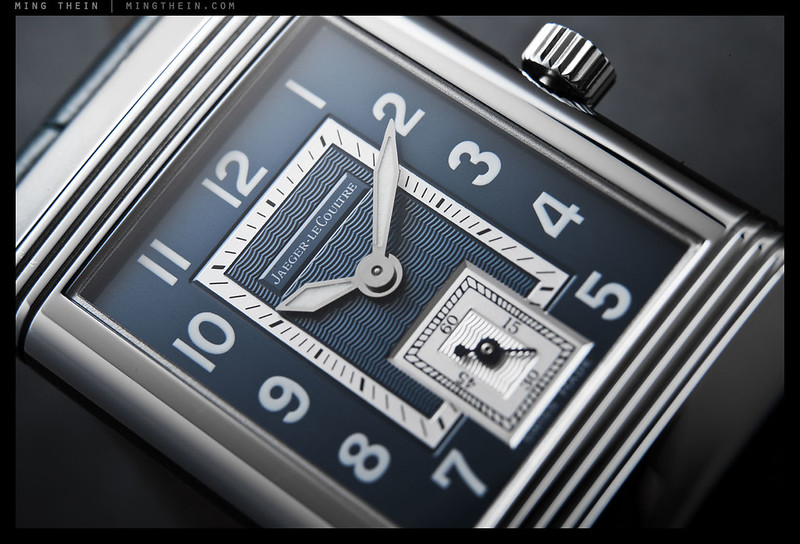
Photoessay: The Jaeger-LeCoultre Reverso Latitude

Not a commercial job, but one of those watches I’d personally encountered once, a long time ago in 2003, but was unable to afford at the time. Nevertheless, it left an impression on me, and from the time I did have the money to spare, I’ve been hunting one down. The problem is that they were very rare to begin with – I believe just 150 pieces were made – and with a very unique and beautiful dial; consequently, they’re rarer than hen’s teeth, and I’ve only ever seen one offered for sale new, and a grand total of zero on the secondary market. On my last trip to the factory, I did ask on the off chance that there was an unsold piece or two in the stockroom; there wasn’t.

On the way back to Kuala Lumpur, I passed by the watch shop in the airport without a second thought; after all, I was late for my flight at that point and had to run. Something compelled me to take a quick look; in a display case hiding behind a pillar was the very watch I’d been searching out for years. Some hasty negotiation ensued – it was obviously a new old stock piece bearing the marks of rough handling, but still sold as new with warranty – they were nice enough to give me a hefty discount and an additional strap. My wallet was suitably lightened, and I just managed to make my flight.

It’s a small watch by today’s standards, but is very thin (and of course mechanical) and pairs perfectly with a suit. The original Reversos were double sided with a blank metal case back, ostensibly to protect the watch while its wearer played polo; these days they’re either used as a second dial for complications, or a canvas for an engraving or art piece. I’m thinking of getting a Hokusai wave enameled on the back, but I’m in no hurry; these things are like tattoos; once it’s on, it’s for life.

If this story isn’t an example of fate and patience, I’m not sure what is. It seems that good things do come to those who wait. MT

This series shot with a Nikon D800E, SB900s, AFS 60/2.8 Micro and Zeiss ZF.2 2/50 Makro-Planar.

_8016093 copy

_8016078 copy

_8016036 copy

_8015995 copy

_8016086 copy

_8016060 copy

_8016089 copy

_8016014 copy

_8015972 copy

_8015953 copy

____________

Visit our Teaching Store to up your photographic game – including Photoshop Workflow DVDs and customized Email School of Photography; or go mobile with the Photography Compendium for iPad. You can also get your gear from B&H and Amazon. Prices are the same as normal, however a small portion of your purchase value is referred back to me. Thanks!

Don’t forget to like us on Facebook and join the reader Flickr group!

appstorebadge

Images and content copyright Ming Thein | mingthein.com 2012 onwards. All rights reserved

10×10: 100 ways to improve your photography

This article was originally posted in a series of 10 mini-exerpts back in the very early days of the site; Google Analytics tells me that it was hardly viewed, which is probably a shame – so I’ve re-packaged, updated and re-presented it again here as a monster all-in-one reference. Enjoy. MT

Disclaimer: I’m assuming you already know the basics.

Part one: Compact cameras

Pretty much everybody has a compact, even if it’s only the one built into your phone. It’s no good for serious photography. Or is it? You might find yourself using it more if you try some of these ideas…

10: Carry spare batteries. One in the camera, one in your pocket or one charging. This lets you keep going – especially important since compact battery life is often terrible.

_0011755bw copy

Crossing thoughts. Ricoh GRDIII

9: Use the hand strap. It seems obvious, doesn’t it? But you’d be surprised how many people don’t, and then land up having to buy new cameras.

IMG_1330b copy

Car reflection. Ricoh GRDIII

8: Shoot bursts, if you have a useable buffer. Without the buffer, you’ll just have to rely on timing and counting shots – think of it as a revolver rather than a machine gun. The same rules about the middle shot being stable and sharp in a burst also apply to compacts.

_0011033bw copy

Zoom. Ricoh GRDIII

7: Keep ISO as low as possible, and make use of the stabilizer. Most good compacts have stabilizers; this is because even with the 1/focal length rule, there’ll be enough camera shake to blur things – you’re holding a light object at arms’ length and trying to keep it still. Granted, there’s no mirror slap, but there’s also nothing to brace against, either. Keeping the ISO as low as possible lets you maximize image quality. There’s usually a big difference between even base ISO and one stop up; know the limits of usability and don’t exceed them.

_0011069bw copy
Crossing, London. Ricoh GRDIII

6: Look at the whole frame. I’m not sure how to say this more succinctly: there are things compacts can do that larger sensor cameras can’t – think of telephoto/ compressed perspective shots where everything is in focus, for example – and vice versa (shallow depth of field, wide FoV). Look at the whole scene, and see how you can use these strengths to your advantage. Images shot with compacts that work actually force you to have a much stronger composition, because you cannot rely on the crutch of bokeh or let the lens do the talking.

_0011492 copy
On set in the afternoon. Ricoh GRDIII

5: Spot meter. Dynamic range on all compacts is limited because the pixels are small. This means losing the shadows or the highlights is inevitable under most situations; you need to decide which one is important. The spot meter (and a half press to lock exposure) helps you to do that. High key = keep the shadows and lose the highlights; low key = keep the highlights and lose the shadows; most important however is making sure the subject is properly exposed – use the spot meter over faces, for instance. The other alternative is to use the spot meter on highlights and add a stop of exposure compensation – the meter will try to average a middle gray exposure out of whatever you place the box over; you know the camera has a little more tonal range in it if the highlights are at middle gray, so you can safely add some positive exposure compensation. This generally makes the rest of the image a little dark – especially under harsh light – but it also has the side benefit of making the colors richer.

_0012133 copy
The fountain of capitalism. Ricoh GRDIII

4: Use P mode. I’d say leave it in full auto, except most of the time that doesn’t let you control exposure compensation and metering – those are important. Why not use aperture priority, as I’d recommend with a larger sensor camera? Simple: there’s no point. The real focal length is so wide and the lenses usually so slow that DoF is enormous, and changing the aperture isn’t going to do anything other than reduce the amount of light reaching the sensor. Great if it’s bright, but if you stop down too much, you’re going to to induce diffraction and just land up with soft images.

_0011105bw copy
Affection waiting for the bus. Ricoh GRDIII

3: Keep the lens clean. I’m constantly surprised by how many people have dirty lenses on their cameras and then complain that the images aren’t sharp, or that they can’t see anything in the finder – but there’s fingerprints all over it. It’s especially important on a compact as the small sensor and high pixel density are very demanding of lenses; the more aberrations you have on yours, the lower resolving power is going to be.

_780_IMG_1719bw copy
After prayers. Canon SD780IS

2: Prefocus. Although focusing speeds have improved dramatically, what’s really nice about most point and shoots is the half press to full press lag is actually quite low – but you need to be prefocused first. In any case, the huge DoF will cover any minor focus errors. Most fleeing moments can be captured with a compact and a little anticipation.

_0011588 copy
Break. Ricoh GRDIII

1: Set up your camera to either shoot raw, or output as neutral a jpeg as possible. If you can’t get a raw file, there’s still a lot that can be done with a good jpeg – what I usually do is reduce contrast to minimum to preserve the highlights and shadows; turn saturation down, and lower (but not zero) sharpening. Reason being that if you zero sharpening, you do generally lose some detail on compacts as this step is applied to the raw data in the imaging engine before being saved as a jpeg. You’ll be surprised how much you can do with one of these files afterwards in photoshop. Similarly, avoid those fake HDR or extended dynamic range modes; they might appear to help but what they actually do is make highlights look very unnatural because the tonal values overlap with other parts of the luminance range.

IMG_0861b copy
Vehicular architecture. Apple iPhone 4

See more of my small-sensor compact camera work here on flickr: click here

Part two: DSLRs

Disclaimer: I’m assuming you know the basics already, but want to get serious.

10: Control your view. Use the viewfinder when you can; there’s less lag, you can brace the camera against your face to increase stability, the dynamic range and resolution are higher, it’s a more direct connection to your subject and it saves power to boot. But why not use live view if you’ve got it, especially coupled with a swiveling screen? For critical focus, odd angles, and video, it’s actually pretty handy. Though I personally avoid it like the plague unless i have no choice.

_X1_L1001362 copy
The big brass band. Not strictly an SLR shot, but live view did help me to get this angle without sticking my face on the floor. Leica X1

9: Shutter button technique matters. You’d be surprised how many people just jab the button and wonder why the camera isn’t responding. Firstly, don’t jab. Roll your finger gently to reduce camera shake. Secondly, prefocus; the shutter button has two stages – the first activating autofocus, the second, shutter release. If you have focus already going, then your lag is going to be much, much shorter than if the camera has to do all the work when you press the button – even on the fastest cameras. Finally, you’d be surprised how many people use the horizontal release in portrait orientation even if they have a vertical one – don’t. It’s less stable, and frankly you just look silly.

_7033388 copy
Night party. It looks bright, but the EXIF will tell you otherwise. I needed every single trick in the book to get this shot: stratospheric ISOs, low shutter speeds, and a fast f1.4 lens wide open. Nikon D700, 24/1.4.

8: Turn the in-camera sharpening and contrast up to maximum. What? Why? There’ll be haloes! I can hear the cries of incomprehension and derision already. First caveat: you must shoot raw. Second caveat: use a raw processor that ignores the camera’s proprietary processing tags, e.g. Adobe Camera Raw. The reason why you want to crank both of these things up is that the camera’s preview engine generates a jpeg based on these settings; if your exposure is okay with the contrast at maximum, then you know you’ll have more shadow and highlight latitude. And high sharpening accentuates the differences between in focus and out of focus.And it also accentuates noise; basically, the combination of these settings makes it easier for you to tell if you’ve nailed it or not.

_3035242 copy
Work that perspective. Nikon D3, 70-300VR

7: Don’t let zoom lenses make you lazy. Select a focal length based on perspective, not angle of view: in other words, don’t use a wide lens because you want to get more of the scenery in, or a telephoto because you want to get closer. Instead, wide is for accentuating perspective, telephoto is for compressing it.

_7021180 copy
Action. An interpretation of the famous first series of motor drive images that showed a galloping horse’s legs do in fact leave the ground simultaneously. Nikon D700, 28-300VR

6: Shoot in bursts. Events evolve. The first shot may not be the best, or you or your subject may move. A burst is insurance, and if they’re all perfectly focused and exposed, then it lets you select the best image – say for minor variations in facial expression of a portrait. Note that I don’t mean machine gunning the shutter until your buffer is full; three or four shots is usually plenty.

_3100_DSC2015 copy
Fire. The balloon was firing on and off unpredictably. It would be a lot more difficult to get this shot without auto ISO. Nikon D3100, 85/1.4 G

5: Use auto-ISO, but only if it’s configurable. If the minimum shutter speed is not configurable, you don’t know at what shutter speed the camera is going to start bumping the sensitivity; if it’s too early, your images will be grainer than they need to be. If it’s too late, then you may not have enough shutter speed for a sharp shot.

_7026879 copy
Cheers. Tough lighting; how do you know what your camera is going to expose for if you haven’t tried it out? Nikon D700, 85/1.4 G

4: Know what your camera is doing: AF, metering, auto-ISO. This is actually very, very important. If you don’t know how your camera responds under a given situation, how do you know if you can get the image or not? There’s no shortcut to this other than a lot of practice and experimentation.

_3033422 copy
Alien. I prefocused on the spot where the man would be when the light was exactly behind and over him, then waited. Nikon D3, 24-70/2.8 G

3: Have some way to control your AF: either use AF-ON or AF-L, together with continuous focusing. Autofocus is an aid, not a crutch. Auto-select point systems will seldom select the point you want; they’re useful, but only in an environment where you have a lot of randomly moving subjects and need to pick the closest one. When you have something a bit more sedate, tell the camera what to focus on. Use continuous autofocus, because everything moves, if only slightly; the larger your aperture, the more this will matter because depth of field is shallower and probably won’t be sufficient to cover subject movement. I prefer to have AF activation on the shutter button and an AF-Lock button configured under my right thumb – this is so I know I can just press one button and have a high chance of getting the shot – but I also know of plenty (most sports shooters?) who configure AF-ON under the thumb, and the shutter button to capture the image only. AF Lock for that configuration is of course done by releasing the AF-ON button. Try both and see which works for you.

_7025384 copy
This was actually shot in a well lit carpark, but with a stopped down lens and fast shutter speed to eliminate ambient and have nearly 100% of the exposure provided by the flash. If I’d shot aperture priority, I’d still be able to see the surroundings. Nikon D700, 28-300VR and three SB900s.

2: Shoot aperture priority, except for flash. This is the easiest way to maximize control of your camera: aperture priority to control depth of field, manual mode if you need to balance flash and ambient lighting.

_7030982 copy
Watching the world pass by. Imagine this frame without the edge intrusions: it’d feel pretty different, wouldn’t it? Nikon D700, 85/1.4 G

1: Watch the edges of your frame. I’ll say it time and again: what usually makes or breaks a photo, or the difference between an excellent image and an outstanding one, is how well the subject stands out. This is both a function of subject lighting, positioning and focus, as well as the inverse: what other things are there in the frame that take attention away from the subject? Intrusions into edges are one of the main ones. Conversely, there are also compositions where edge intrusions are welcome, or even make the image: they suggest things that might not be there, or leave things to the imagination of the reader. Use with care!

Part three: Mirrorless cameras

Mirrorless: the middle child? Maybe. But even a diehard sceptic like me has discovered that these things have their uses –just be clear about your expectations.

10: Spare batteries are an absolute must. Due to the large sensor, LCD and high demands from lens focusing motors, stabilizers and the like, mirrorless cameras have the highest power draw of any type of camera (other than medium format digital, it seems). Make sure you have at least two to get you through a day, maybe with an additional spare.

_PM05280 copy
Moon over Prague Castle tower. Olympus E-PM1, 45/1.8

9: When selecting a camera, look at two things: useability (including lens choices) and raw sensor quality. I’ve tried the Panasonics, Sonys, Fuji and Olympus systems; of all of these, only the Olympus E-PM1 Pen Mini stayed more than a month. Why? Because it’s the most responsive and configurable of them all. The Panasonics are very configurable but not very user friendly. The Fuji X100 has the best image quality, but the firmware is a disaster and it’s slow as molasses. The Sony is reasonably responsive, but not so easily configurable and the lens choices are pretty limited. And the NEX-5 I owned had a strange color palette. And don’t pick one so big that you might as well take your DSLR.

_PM03783 copy
Lange Datograph. Olympus E-PM1, Panasonic 20/1.7

8: Use a hand strap instead of a neck strap. If it’s in your hand, you’ll be ready faster. And more likely to use it. And the weight/ size aren’t so bad you need to hang it around your neck or shoulder for relief. It also takes up less space in your bag when you have to store it.

_PM00545 copy
Reflections. Olympus E-PM1, 14-42 kit lens

7: Adaptors are useless. Although they seem like a good idea, mirrorless systems are optimized for telecentric lenses with very short back flange distances; conventional SLR or RF lenses aren’t designed like this and thus don’t work well on mirrorless cameras. It’s quite well known that RF wides have numerous issues like cyan/magenta shifted corners, increased CA and vignetting. Adapted lenses are also bulky and lacking in automation – no AF, no aperture control, no stabilizer. And accurately manually focusing something held at arms’ length is near impossible.

_PM03612 copy
Burlesque. Olympus E-PM1, Panasonic 20/1.7

6: Remember the lag. Even though release lag may be in the 30-40ms range, you’re going to have another lag induced by the LCD itself – the best models refresh at 60hz, which means you’re looking at least another 15-20ms (or more) of additional lag as the screen refreshes to show the current scene. Practice to get a feel for the rhythm of the camera.

_DSF1891bw copy
Garage classic. Fuji X100

5: Avoid continuous AF. Contrast detect AF systems still aren’t good enough to track moving subjects – with the exception of the hybrid system in the Nikon V1 that also has phase detect photosites built into the sensor – so either prefocus and anticipate, or cover with DOF.

_DSF1421 copy
After school in Kathmandu. Fuji X100

4: Carry it everywhere. No point sacrificing image quality if you’re going to leave it at home like the full size camera. This is also why I’m drawn to the smaller, more pocketable mirrorless cameras like the Olympus Pen Mini. I’ve put it on a hand strap and use a pancake lens most of the time; it’s not a lot bigger than a compact but produces vastly better image quality.

_N5_DSC0100 copy
Mosque architecture. Sony NEX-5, 18-55 kit lens.

3: Use the EVF if you’ve got one. Like any optical finder, bracing the camera against your face helps stability immensely. I’m not recommending going out and buying an add-on finder; these are usually flimsy, unwieldy and dramatically increase the size of the camera – defeating the point of mirrorless in the first place.

_N5_DSC0111 copy
Before prayers. Sony NEX-5, 18-55 kit lens.

2: 1/focal length rule doesn’t apply anymore. Why not, aside from crop factor? Because most of the time you’ll be using live view and holding the camera at arms’ length – this means increased propensity towards camera shake. Double, or even triple that for critical shots or action. Or use a flash. And while stabilizers help, they probably bring the safe speed into the 1/fl rule or maybe very slightly better.

_N5_DSC1260 copy
Arch. Sony NEX-5, 18-55 kit lens.

1: Compose like an SLR, shoot like a compact. They’re hybrids, right? Treat them as such. You get the DOF of an SLR – which means you have to watch your focus point, and take care in choosing perspectives. But you also have the limitations of a compact – so remember to watch your exposure/ highlights/ shadows; prefocus; don’t expect it to be able to track moving objects. Remember the limitations of both, and that should give you a good idea of how to get the most out of your mirrorless camera.

_PM04986 copy
Hitchcock scene, Vienna. Olympus E-PM1, 45/1.8

See more of my work from the various large-sensor mirrorless cameras here on flickr: Olympus Pen Mini E-PM1; Sony NEX-5; Fuji X100; Leica X1

Part four: Rangefinders

10: Timing, timing, timing: shoot lots and get to know the lag rhythm of your camera. It might feel instant, but it isn’t. That split second can make or break the difference in a critical shot, especially during a fast-paced situation – that fleeting expression, or arrangement of people.

_M9P1_L1011219 copy
Entranced. Leica M9-P, 35/1.4 ASPH FLE

9: Get to know your lenses: There is no such thing as the perfect lens. All of them have idiosyncrasies, be it focus breathing, focus shift, curved focus planes, flare under certain conditions, or maybe the ability to produce brilliant 14-pointed stars from point light sources at f16. (Don’t laugh, the Leica 21 Summilux ASPH does this.) The better you know your lenses and the way they draw, the more you can exploit their properties to help your pictorial rendition of a given situation. It’s also why I’ve got eight ways to get to 28mm – there’s a huge difference between the Zeiss ZF.2 2/28 ‘Hollywood’ Distagon and the Ricoh GR-Digital III, for instance.

_M9P1_L1003203 copy
Gluhwein time, Vienna. Leica M9-P, 50/1.4 ASPH

8: Use a soft release and thumb grip (and maybe front grip). Anything that can make your grip more secure or comfortable, and your shutter release action more gentle, is your friend. I like the Thumbs Up, personally.

_M9P1_L1014802 copy
Seeing the wood from the trees. Leica M9-P, 21/3.4 Super Elmar ASPH

7: Don’t limit your subjects to the center focus point. You can focus and then recompose. But remember that most lenses aren’t flat field (especially rangefinder designs, which are usually non-retrofocus and spherical) so a little tweak to the focus ring is required for edge subjects – usually to make the focus point slightly closer, as the focal plane will be curved slightly around you. Experience is required to determine exactly how much and when to shift – this is why I also highly recommend using fewer lenses but knowing them well.

_M9P1_L1003347 copy
Morning mass, Stefansdom. Leica M9-P, 28/2.8 ASPH

6: Use the DoF scales to prefocus. Especially useful with wide lenses, whose large DoF means that you might even be able to shoot hyper focal and not have to focus at all: especially great for being fast and reducing time between seeing the shot and capturing it. Very important skill for street photography and photojournalism. You can practice this by estimating distances and setting your lens with the camera at waist level, then checking in the finder.

_M92_L9998120bw copy
Self portraits. Leica M9, 35/1.4 ASPH FLE

5: Pay attention to the edges. The frame lines are a suggestion: there will be more included. With experience, you can push the composition a bit and still get everything in.

_M9P1_L1015932 copy
Color wall. Leica M9-P, 50/2 APO

4: Shoot with both eyes open. The nice, bright, high-magnification finders are great for letting you a) see what’s outside your frame and might make composition better or worse if included or excluded; and b) you can keep both eyes open to enhance your peripheral vision. It’ll also stop you from getting run over.

_M9P1_L1003513bw copy
Tea time. Leica M9-P, 28/2.8 ASPH

3: Know the limitations of the system. By their nature, your finder will probably only cover 28-135, and not be very accurate for 90 and 135. So really, the strengths of the system lie in the 28-75mm range; don’t try and do birding with one of these things and wonder why your results aren’t up to par. (Note: I do use my M9-P for macro work, but that’s a different story entirely.)

_M9P1_L1013066 copy
Bangkok. Leica M9-P, 35/1.4 ASPH FLE

2: Less is more. Rangefinders are small and light: why burden yourself and turn photography into endurance sherpa-ing? Try reducing your regular kit to two, or better yet, one lens. Either something which provides to distinctly different perspectives, or perhaps something in-between. I choose 28/50, after a long time trying to make the single 35 work for me. It just didn’t agree with the way my eyes worked, which is a shame because the 35/1.4 ASPH FLE I had was easily one of the best lenses I’d ever used, period.

_M9P1_L1007298 copy
As above, so below. Leica M9-P, 28/2.8 ASPH

1: Check your rangefinder calibration. There’s nothing worse than shooting an entire series at f1.4 and thinking you nailed focus – or at least remembered doing so in the finder while shooting – then being horrified as you open up the set only to find your subjects’ noses in focus and their eyes a distant plane away. If you know how to calibrate your rangefinder, great; if not, it might be the subject of a future post here (but I take no responsibility if you damage something or void your warranty). If you don’t dare, send it in to your dealer. The best thing you can do is have your body calibrated to match all of your lenses – so send them all in at the same time. The next best thing is to have it calibrated for the lens with the shallowest DoF; the one exception is if the lens suffers from focus shift. Then you’ve got no choice but to calibrate for your most frequently used lens and remember which direction to adjust for later. Check calibration often and if you get a new, shallower DoF lens. One last related point: make sure all of your viewfinder windows (VF, RF patch, frame lines, front VF) are clean – you’ll be surprised how much easier it is to focus!

Bonus for Leica M8/9 users: The meter is center weighted and very heavily biased towards protecting highlights. So, for backlit subjects there are a few ways of compensating. a) Lock exposure with the camera aimed at something of roughly equal luminance but not backlit; this works on the shutter half-press position (with a little dot displayed at the top between the leftmost digits in the finder) if you’ve got the release mode set to standard. b) For M9 users, use the rear dial to activate exposure compensation. I personally don’t like this, because I have no idea if I have it set or not, and if so, how much. c) If you’re shooting with fixed and not auto-ISO, then note the shutter reading in the finder, and move the shutter dial to something appropriate. I use a slightly more complicated method, with auto-ISO: if the shutter speed displayed is over the minimum you set, then you know the camera is in base ISO. I just manually set it to something lower; the camera can’t lower the ISO any more, so it overexposes as desired. If the situation is dark and you’re above base ISO, this doesn’t work. In very dark situations, I usually just leave the camera at ISO 1250 and go manual with the exposure. 

See more of my work with the Leica M9-P here on Flickr: click here And for earlier work with the M8, click here

Part five: Photojournalism and street

Photojournalism (hereafter PJ) and street photography go hand in hand: they’re about capturing a moment of life. PJ goes a bit further by adding a story to that moment; street can just be an aesthetically pleasing moment in and of itself. Both though require the photographer to be observant and ready. This is what works for me.

_M9P1_L1004918bw copy
Protest Kabila, Prague. Leica M9-P, 28/2.8 ASPH

10: Watch your shutter speeds. You’re going to need more than 1/focal length – maybe 1/2x to be safe, or even 1/3x if you’re running and gunning. You’re moving, your subject is moving, and nothing is steady. Remember also that the higher the resolution your camera, the less forgiving it is of focus errors and camera shake.

_0010613bw copy
Rain, London. Ricoh GRDIII

9: Small, nondescript cameras are best. They don’t draw attention to you – especially in the current day and age of everybody carrying a camera, nobody is going to take you seriously if you have a small black compact. You’d be surprised how much I get away with using the iPhone or Ricoh GR-Digital III. People simply don’t perceive it as threatening in the same way a pro DSLR and 70-200 might be. Compacts also give you more depth of field for a given aperture.

_0010654bw copy
Morning paper, London. Ricoh GRDIII

8: Shoot wide and close. The perspective produces a stronger image; wide lenses are also more forgiving to focus errors and camera shake. And as a bonus, you get context in the frame as par for the course.

_M8_L1024678bw copy
Learning English. London. Leica M8, 21/1.4

7: Anticipate and observe. To quote the Cartier-Bresson: pick the decisive moment. To do so, you need to be aware of everything around you; really look. Pay attention to the details. People are fairly predictable; it should be easy to spot if something out of the ordinary is about to happen. Anticipation of the action gives you a vital few seconds more to prepare and be in position, or have the camera out.

_7032151bw copy
Bicycle, Kathmandu. Nikon D700, 24/1.4

6: Blend in. Act like you belong, dress nondescript, and nobody will pay you a second glance. It will make your job a lot easier. If you draw attention to yourself – be it by being uncertain or provocative – then people of course notice.

_220_IMG_0251bw copy
Oblivious. I was standing 3 feet in front of them. Canon IXUS 220HS

5: Always have the camera to hand. How are you going to get a quick shot off if the camera is in your bag? You should be able to get a shot in less than 5 seconds – sometimes your window is even shorter than that.

_7030375bw copy
Trekking office, Kathmandu. Nikon D700, 85/1.4 G

4: In a real emergency, help. Yes, our duty as a PJ is to record, document, communicate and raise awareness about the events around you; you help by telling a story. But you don’t have to shoot all the time. Get your shot and then help out the people. Remember that at the end of the day, we’re all human.

_7026532 copy
Street party. They would need help the following morning. I didn’t stay that long. Nikon D700, 85/1.4 G

3: Practice, practice, practice. Use your camera until you’re fast and proficient; you should be able to visualize the frame and field of view without having to raise the camera to your eye. You should be able to set things by muscle memory and have a group of settings (if your camera supports this) that configures the camera to be ready to go.

_X1_L1000191bw copy
Reflections. Leica X1

2: If spotted, acknowledge your subject. A friendly smile, a sincere nod – all of these things make people feel comfortable with your presence and make your life easy. You don’t have to stop and talk or explain what you’re doing if nobody is asking. Smile and move on. Done.

_PM01880bw copy
Smoking break. Olympus E-PM1, 45/1.8

1: Be confident. It is better to say sorry rather than ask permission and miss the shot. With that, go out and be productive.

_7036946 copy
Martial law, Kathmandu. Nikon D700, 24/1.4

See more of my photojournalism work here on flickr: click here

Part six: Lighting

This post deals with the light you create. You can’t always find what you need, so it’s important to know the dos and don’ts of off camera lighting. My tips apply to speedlight users; I’ve never been a huge fan of monoblocks, nor have I used them very much since Nikon launched their CLS system. Sure, sometimes you wish for more power, but then again you remember that you can go for hundreds, if not nearly thousands, of shots on a set or two of AAs – instead of carrying a 50kg lead acid lump around. Read on.

10: Always shoot in manual mode with flash. Otherwise, there’s no way you can balance your flash and ambient exposure; if you want all flash, then you can dial in the highest sync speed possible – this will help you avoid camera shake. If you let the camera decide, it will usually only get it right for the center portion of the frame when the flash exposure is much greater than the ambient exposure. This is to say, most camera systems are useless at daylight fill, especially under very bright conditions.

_3009512bw copy
Inspector. Note how inside/ outside luminance is balanced. Nikon D3, 24-70, one SB900 in a soft box.

9: Imperfect diffusers and softboxes add character to portraits, but not product shots. Uneven lighting for most product shots just makes the object look odd. For people, it can be strangely flattering. Consider making some shoddy homemade internal baffles for your portrait soft boxes.

_M220416bw copy.jpg
Shoddy baffling adds character! D200, 17-55/2.8, 2xSB600s in homemade soft boxes.

8: If you’re controlling lighting, you shouldn’t have blown highlights or blocked up shadows – unless you want them. Self-explanatory. Your lighting isn’t balanced properly. Try again.

_3007528bw copy
Intentional outline. Nikon D3, 105VR, one SB900 off camera.

7: Those clip on diffusers are pointless. A small light source can never replicate a big light source unless you expand (and diffuse) it – be it bouncing off the ceiling, or a softbox. A little clip on diffuser is just going to make a small, diffuse source – which at any distance, looks like a small intense source except weaker. You’ll get the same reflections and general lighting feel. All you’ll have done is a) look stupid b) wasted your money and c) lost at least two stops of light. I’ve never even used the diffuser domes supplied with any of my flashes; they’re still in the plastic bags they came in.

_7049184 copy
Unrelated shot. Speake-Marin perpetual calendar. Nikon D700, 60/2.8 G, one SB900 and diffuser.

6: Duct tape is your friend. Use it to tape flashes in odd positions to whatever supports might be handy; sometimes you just can’t erect a flash stand in the place you want it. But you could tape the flash to the ceiling. I’ve done it before.

_3009669bw copy
The Hollywood shot. Flashes duct taped to curtain poles. Seriously. D3, 24-70/2.8 and three SB900s

5: More flashes are better. I’ve got four; two primary units, one spare, and one more unit to use as a commander on cameras without a built in (Leica M9-P, I’m looking at you). Legend has it that Joe McNally travels with an entire suitcase of SB800s. I dread to think how many batteries he goes through every year.

_7047913 copy
Alfabeti. Nikon D700, 60/2.8 G 2xSB900s

4: If you’re short of lights, consider a reflector. Positioning one light directly opposite the reflector gives you another pseudo-light – depending on the reflector, it could be as little as 1 stop light loss – think of a mirror, for instance. A more diffuse reflector can provide gentle fill.

_X1_L1001004bw copy
Leaf shutter benefits. Leica X1, SB900, 1/2000s.

3: Higher sync speeds are better. Pro DSLRs top out at 1/250s for full power, or less power and faster – but these are not true ‘flash speeds’, because the flash has to fire for longer but at reduced power – note how the flash no longer freezes motion at 1/8000s as much as it did at 1/250s. Leaf shutter compacts like the Ricoh GRDIII and Leica X1 both sync to 1/2000s; they’re great for capturing motion or providing balanced daylight fill, where your ambient shutter speed might be very high. You won’t lose the highlights, and you also won’t lose the shadows – thanks to your high sync speed.

_7022462 copy
Dessert. Balanced with ambient daylight in restaurant. Nikon D700, Zeiss 2/28 Distagon, 2xSB900

2: Remember the eyes. For living subjects, a little catch light reflected in the eye can make all the difference between a flat, boring shot and a portrait that looks alive. Use a reflector, or if you’re using Nikon CLS, the trigger flash on your camera works fine too.

_X1_L1000981bw copy
Note the eyes. Leica X1, SB900.

1: Spare batteries are important. Never get caught short. I avoid NiMH as they tend to exhibit the memory effect, especially if not used frequently – as would be typical for your second or third spare set. The Sanyo Eneloop batteries are fantastic – they really do hold charge like alkalines, but have the reuseability and current draw properties of NiMH. I’ve got eight sets of these for my flashes, and only charge them when depleted.

_7040287 copy
Macro lighting is quite a different game entirely. There isn’t a lot of working distance, and you need a lot of diffusion to create the same apparent perceived light source size.

Part seven: Postproduction and editing

Photoshop is a fix all for everything, right? It’s also come to represent a dirty word; when something has been ‘Photoshopped’ it’s no longer authentic or original, and the skill of the photographer has been severely diminished. Wrong, think again. Photoshop is the equivalent of the darkroom from the film days: sure, you can add things to the scene, but they look odd and unnatural. The main thing you did in the darkroom was finalize the exposure: adjust the density and brightness, and fiddle with the contrast. Maybe some dodge and burn. How? Chemical mixes, timing and cutout masks. We do the same now – except the chemicals are your raw converter and curves layer, the fixer is your save button, and dodge and burn is a brush tool.

So what is editing exactly? The process of removing unwanted material – in this case photographs – to leave a more coherent story or narrative; being selective about what you show is just as important as having something to show in the first place. There’s no point in having technically brilliant but boring images – but you can make a story out of perfectly timed moments, even if they’re a little noisy or blurred.

_7051046 copy
The flying Vianney Halter for Goldpfeil. Nikon D700, 60/2.8 G

10: Keep all of your raw files. You never know when somebody might ask for a color version of a B&W image; don’t lose that sale because you were trying to be cheap on storage. Storage IS cheap.

_M9P1_L1005824bw copy
Sinister chitty chitty bang bang. Leica M9-P, 28/2.8 ASPH

9: Sharpening should be the last step. If you sharpen too early on, you’re to end up with extra noise and less tonal information, especially for images with a lot of fine detail. Why? Because of the way sharpening works. It increases apparent acuity between adjacent areas of different luminance by increasing the difference in luminosity between them. Making something brighter or darker – with images containing a lot of fine detail, this means a change to a large area of the image – will inevitably destroy some tonal information, especially at the extreme ends of the tonal range.

_7046623b copy
If the G-P F1-047 was titanium and on a blue strap…it’s really aluminum and on a tan strap. Nikon D700, 60/2.8 G

8: Let your images mature before deleting. Look at your images immediately after a shoot and pick out your favorites. Then do this exercise again two weeks later. You’ll probably find that there’s been a big change. Why? Immediately after the shoot, you remember how difficult it was to get one shot; that effort put in affects your artistic judgment. Two weeks later, you’ll probably not remember as clearly, and you’re more likely to go with your first instincts. Go with the latter selection.

_m9p1_l1007784 copy

_m9p1_l1007781 copy

A tale of two frames. I initially preferred the first frame; but a month later, I think there’s more of a story and more contrasts in the second one. M9-P, 28/2.8 ASPH

7: Calibrate your monitor. Whether you use one of the Spyders or the built in utility in OS X, it’s important to adjust your monitor to produce as accurate color as possible – this is important for both print and screen; you want to make sure that other people see the same thing you put in so much effort to create. For print, you can attach the color profile to the file; a good printer will be able to match the print to what you see on screen. It’s also important to know the gamut of your monitor; I’ll never do any serious editing on my 11” MacBook Air because the screen has terrible color. On the other hand, the 27” iMac/ Cinema Displays are fantastic, as are the 15” and 17” MacBook Pros.

_M8_L1023901 copy
Intentional color. Leica M8, 21/1.4 ASPH

6: Do most of your adjustments in the raw converter. This is important, because the data is in its highest bitrate form – which means making large changes to the file at this stage has the least impact on image quality. If you do highlight recovery on a 16 bit raw file, you’ll probably have a decent stop or two (assuming a good sensor) before you get posterization or false color. Now try doing the same to a jpeg and you’ll see what I mean. By the same token, keep your files in the highest bitrate form until you’re absolutely sure you’re not going to change anything again – and that might be a Photoshop file in 16 bit with all layers, or it might be a quality 12 jpeg. I generally don’t edit again, so I save my finished files as a maximum quality jpeg. Remember that print doesn’t have as much dynamic range as a computer screen, so if it looks fine on a calibrated monitor, it’ll probably look fine in print.

_D90_DSC5601 copy
Sunset shadow. Nikon D90, 18-200VR.

5: Buy a good tablet. I like the Wacom Intuos 4. It will help you immensely to lay precise masks and control your dodge and burn; the tip is pressure and tilt sensitive to control brush size and density. It’s much faster than doing things with the mouse, too – once you get used to how the entire tablet area maps to your screen. Get one that suits your screen size. The medium 6×9” is perfect for my 15” MacBook Pro.

_M8_L1017183 copy
The Beach. Leica M8, 50/1.4 ASPH

4: Don’t overdo anything. Turning it up to 11 works for some shots, but not most. Too much sharpening leaves haloes. Too much contrast loses tonal detail. Too much saturation makes it feel unnatural and cartoonish. Etc. And don’t even get me started on overuse of HDR; overlapping tonal values are jarring to the eyes.

_D90_DSC2987 copy
Turning it up to 11. Nikon D90, 105VR

3: Always have backups of your backups. I’ve had a situation where a new OS caused some serious issues with my primary computer; the upshot was that none of the files were readable. My primary backup drive – a Maxtor; I’ll never buy one of those again, just too many have failed – started making the click of death when I connected it, and I was able to get most of my data off in time before the drive crashed and died. Good thing there was one more backup copy. My current management strategy is to keep all finished jpegs on my editing computer; there are two duplicate backups with all the raw files (in the same file structure) on external drives, one of which lives in my bag and goes with me everywhere; I also time machine the primary drive whenever I do a backup to the externals. Generally I’ll do a backup once I finish editing a batch, which might be 50 or 100 images or thereabouts. Storage is cheap. Lost files are priceless.

_3029853 copy
Blue water. Nikon D3, 24-70/2.8 G

2: Integrity matters, especially for photojournalists. Whilst I’ll have no compulsion removing dust from a watch product shot or litter from fine art street photography, I absolutely will NOT touch the content of the image for photojournalism. This is because once you do, and if you get caught, your credibility is instantly nonexistent.

_7047519 copy
Panerai Mare Nostrum, on a GuB Marine Chronometer. Clean well, because even at this relatively low magnification, it’s very visible. Nikon D700, 60/2.8 G

1: You can’t polish a turd. Don’t think that you can rescue a compositionally weak image ‘in Photoshop’. You can’t. You can’t change the lighting. If you didn’t get it mostly right in-camera, you’re not going to be able to fix it in Photoshop. You can fix exposure, color, contrast and the way the image appears; you can’t change the content. If an image is good, however, you can make it extraordinary.

_7049521 copy
Color palette and tonality hugely affects the feel of an image. But the content must be there to tone in the first place. Nikon D700, 28-300VR


Part Eight: General tips for all photographers

Here are some suggestions that apply to everybody, regardless of what or how you shoot.

_M9P1_L1007399 copy
Prague. Leica M9-P, 28/2.8 ASPH

10: Shoot raw and expose a little bit hot. There’s always a bit of potential to recover highlights in your raw files; some cameras more than others. Know how much yours can tolerate before blowing highlights completely. It’s not just a way to expand dynamic range; exposing hot and bringing down the exposure later actually reduces shadow noise, too. For those of you using a third party RAW converter that doesn’t read proprietary image settings, crank your sharpening in camera up to maximum – it won’t affect the raw file (only the jpeg preview), but you will be able to more easily see if things are in focus or not when using the image review screen.

_M8_L1017249 copy
But we all have favorites. Billingham Hadley Pro. Leica M8, 50/1.4 ASPH

9: There is no perfect bag. Just accept it, and move on. Buy a new one if it takes your fancy but don’t expect it to solve all of your problems. Most of the time I only use a bag if I have other non-photographic items to transport. If it’s camera-only then it just goes over my shoulder.

_M9P1_L1004990bw copy
At the station. Note clean edges and overall feel of the image. Leica M9-P, 28/2.8 ASPH

8: Watch the edges of your frame. Your subject is identified by a) light; b) position in the composition; c) context. The edges add or remove context – and with it, distractions. Use them carefully.

_PM03439 copy
Spotlight. I’d have missed this if I was fiddling with my settings. Olympus E-PM1, Panasonic 20/1.7

7: Learn your equipment. You should be able to operate your cameras like it’s second nature. Muscle memory is your friend, and can make the difference between responding instinctively and getting the shot, or missing it altogether. Practice is the only way to do this.

_PM03858 copy
The ephemeral sushi. Nothing is in focus, the saturation is all over the place, there are hot spots, the color isn’t accurate…but somehow, it works. Olympus E-PM1, Panasonic 20/1.7

6: Look at lots of images. Famous works. Not so famous works. Flickr. It’s a good source of both inspiration and way of helping you to hone your sense of composition.

_D90_DSC0431bw copy
But surely it will make me a better photographer!

5: Don’t buy new gear unless you’re sure you’re not the limitation. Make sure you know exactly what it is that your current gear isn’t doing for you and how the new gear will solve it.

_PM05623 copy
Homage a Rene Magritte. Prague. Olympus E-PM1, 45/1.8

4: Look at other mediums of art for inspiration. It could be painting, design, architecture; for instance I love the way Magritte renders clouds, and I look for that kind of light when shooting skies.

_M9P1_L1005830bw copy
Gorilla in the shadows, Prague. Leica M9-P, 28/2.8 ASPH

3: Look for interesting light, not just interesting subjects. But of course it’s best to have both. The best photos present an unusual subject in an extraordinary way.

_7036002 copy
Precision. I waited for both the sun and the bird. Nikon D700, 24/1.4

2: Be very, very selective with your keepers. Keep only the best. I throw away 99% of what I shoot. Not because it’s bad, but because if you shoot good pictures, then keeping only excellent will make you excellent after a while; if you shoot excellent on average and keep only outstanding, then you’ll be outstanding. And so on. Continually push and challenge yourself – set assignments, practice, tasks. Go outside of your comfort zone, and the persistence will yield results.

_0012621 copy
Serendipity. Interesting things happen when you stick a compact inside a marine chronometer then do wide-angle macrophotography with it; this was my first time trying it. Ricoh GR-Digital III

1: Shoot lots. Practice, practice, practice. Experiment. If it doesn’t work, at least you’ve learned not to do it. If it does, great – another technique to add to the arsenal. I always get asked ‘how do I pick it up? How did you pick it up?’ and my answer is the same: I experimented and shot a lot. But I also made sure I made a note of what I did, so I learned something from the experience. When I started, I was probably doing a thousand frames a day – 99.9% were crap, of course – but slowly that ratio swung. Always carry a camera – even if it’s just your phone – and don’t be afraid to use it.

Part nine: Birding and wildlife

The focus of this post is on birding and wildlife: it’s something that every aspiring serious amateur photographer will probably try at least once, usually right after they purchase an enormous telephoto lens. Bragging rights are only good if you have the images to go along with the lens.

_3022426 copy

Cattle egret. Nikon D3, 400/2.8 VRII

10: Dress right, bring mosquito/ insect repellant, and carry a bottle of water and a hat. The environment where some animals live can be harsh and remote. You’re not going to be concentrating on the photography if you’re not comfortable.

_3020442 copy

Scarlet ibises. Nikon D3, 70-300VR

9: Pay attention to the time of day. There’s no wrong or right time to shoot, but there is good light and bad light. Bad light is flat and uninteresting, and doesn’t flatter your subject. Good light is always tangential and thus creates contrasts; better still, it can isolate your subject from the background. And if there’s plenty of it, that’s a bonus because you can use a higher shutter speed.

_D3T1396 copy.jpg

Eagle. Nikon D3, 300/2.8 VR + 1.4x

8: A sharp but noisy image is better than a noise-free but blur one. Unless your intention is to be artistic or atmospheric, it’s better to have grain than none but also no idea what the subject actually is. This goes for all subjects, and types of photography: if your subject and composition are strong enough, nobody is going to care that the shot is grainy – look at Robert Capa’s Normandy Beach landing photos.

_D3T1215 copy.jpg

Albino peacock. Nikon D3, 300/2.8 VR + 1.4x TC

7: Use single point continuous AF. Avoid the temptation to let the camera decide the AF point; it will almost never focus on the eyes, and certainly won’t be able to recognize animal faces (except perhaps some chimpanzees.) Continuous AF is necessary because your depth of field is razor thin; a little movement to and fro either by you or your subject can move focus dramatically.

_N212242bw copy.jpg

A thoughtful scratch. Nikon D200, 300/2.8 VR + 1.4x TC

6: Shoot in bursts. Two reasons for this: action usually unfolds in a sequence, and the first image may not be the most interesting; secondly, if you’re using a borderline shutter speed, then the burst helps to negate the effects of your finger pushing the shutter (and also camera). The first and last shots will usually be blur, but the middle group will be sharp because you didn’t have to move your finger in between.

_N210426 copy.jpg

Stealth duck. Nikon D200, 300/2.8 VR + 1.4x TC

5: Focus on the eyes. With all living things, the eyes are the key to the soul. I can’t explain why, but everybody knows that a portrait with the subject looking at the camera is a lot more powerful than one where you just see the back of the person’s head. The same goes for wildlife. Better yet if you can get a catchlight in the pupil, be it the sun or a very small fill flash.

_N208281 copy.jpg

Caught in the act of lunch. Nikon D200, AI 500/4 P

4: Have support. I don’t mean a sherpa team or an agony aunt. The longer the lens, the more support you’re going to need. A 0.1 degree camera movement with a wide lens covering 100 degrees horizontally is going to produce 0.1% blur, which you can probably get away with on a small print; but an 0.1 degree camera movement with a 5 degree field of view – corresponding to a 500mm lens – is equivalent to a whopping 2% blur. That shot will be so bad it might as well be completely out of focus. A gimbal head and solid tripod legs are great, but not very mobile. What I prefer to do is use a stout carbon-fiber monopod and rest my arm on the top of the lens to tension the system; if I’ve got something convenient to lean on, then I’ll use a bean bag to support the lens. This gets worse as your lenses get longer – I normally used an old manual focus 500/4 with 1.4x converter on DX, meaning 1,050mm equivalent. Handheld, this is an impossible combination to aim and hold, let alone get a steady shot with. With the monopod technique, 1/50s was routinely possible.

_7030609 copy.jpg

Angry cassowary. Olympus E-410, Nikon AI 500/4 P + 1.4x TC

3: Know our subject. Do your research, learn behavioral patterns, feeding patterns and anything else such as favorite watering spots or trees; the more you know about your subject, the easier it will be to find it and go unnoticed. Also, identify rare or unusual behavior – further adding something unique to your image.

_1D31619 copy.jpg

The bird with the sun hat. Canon 1D Mark III, 500/4 L IS

2: Patience, patience, patience. The rarer your subject, the longer it’s going to take for you to a) find it and b) get into a position where you can shoot it, or where it stays still for long enough for you to get a good image. Give up and call it a day only when you absolutely can’t stand waiting any longer; some of the most stunning wildlife images – think of the BBC Planet Earth series – were only captured after years of waiting.

_MT70034bw copy.jpg

Dancing flamingoes. Nikon D2H, 55-200/4-5.6 DX

1: Be ready and stay alert. Usually most interesting action happens in a split second; if you’re not ready with your settings fixed and your finger on the shutter, you’re going to miss it. This one seems to conflict with #2, but it really doesn’t; it’s what makes wildlife photography so difficult. Endless waiting, but the need to be vigilant. In the end though, the results pay off.

More of my nature and wildlife work can be seen here on flickr

Part 10: Macrophotography

_7051614 copy
Lange Datograph. Nikon D700, 60/2.8 G

10: Watch your reflections! Every time I shoot something polished and reflective, I keep thinking of this viral internet meme called reflectoporn. Don’t google it. You have been warned.

_7053570bw copy
Jaeger Le-Coultre Gyrotourbillon 2 tourbillon. Nikon D700, 60/2.8 G with 72mm extension.

9: Use bellows or extension tubes to get more magnification. I’ve got both; remember you need to compensate exposure for light loss as your magnification increases. The Nikons do this automatically, but most other cameras don’t. Macro lenses and extension tubes/ bellows work great; make sure they’re high quality items because cheap ones will have non-planar mounts, and result in odd distortion. Note that some lenses won’t work with bellows or tubes because they either bring the focal point inside the rear element of the lens, or the lens design isn’t compatible because the focusing elements are internal.

_3024681 copy
There’s no way you’re getting the entire dragonfly in focus without focus stacking. And they don’t stay still for that long. Nikon D3, 105/2.8 VR + 1.4x TC

8: Diffraction vs. DoF: a tradeoff. Pick one. As you stop down more, your DoF increases; but go too far and you also start to lose resolution because of diffraction. Exactly when this kicks in depends on your focal length and the pixel pitch of your camera; on the D700 with a 60mm lens, it starts around f22 and becomes very noticeable by f32. There are a couple of solutions: use a shorter focal length – the 35 ASPH FLE gives me more DoF by f16; or use a tilt shift lens.

_N201289 copy.jpg
Ants are skittish. Don’t get too close. I’ve had bugs jump on my lens before. Nikon D200, 105/2.8 VR

7: Working distance is your friend. There’s more room for lighting, and less chance of disturbing the subject (especially for those of you who shoot small bugs or insects). For product shoots, since you’re further away, reflections are smaller – and thus require less retouching.

_7055968 copy
Speake-Marin Immortal Dragon. Nikon D700, Zeiss ZM 2.8/28 Biogon

6: Macro lenses are used for macro work for a reason. That’s because they’re optimized for near subject distances; the plane of focus is flat and they have correction for common aberrations (spherical, lateral CA, LoCA) especially close up. With a normal lens, as you get closer, the aberrations and distortions get more and more obvious – which is why you don’t want to use a normal lens and extension tubes. There are two exceptions: when you have no choice, and when using certain particular lenses. A good example is the Leica 35/1.4 Summilux-M ASPH FLE; who’d have thought a documentary/ reportage lens with a 70cm near focus limit performs spectacularly on a D700 with extension tubes?

_7057011 copy
Jaeger Le-Coultre Gyrotourbillon I. Nikon D700, Leica 35/1.4 Summilux-M ASPH FLE

5: Continuous light sources are good. Not for primary lighting, but for helping focus and composition. Better yet if you mirror your lighting position with the secondary lights. I use a pair of 120 LED video light panels.

_7051800 copy
Critical focus plane. Roger Dubuis MuchMore. Nikon D700, 60/2.8 G + 36mm extension tube.

4: Use DOF preview to check your composition. DOF preview? Composition? How are there related? Simple: as you stop down, your composition changes again. And there’s a big difference between f2.8 and f22 at macro distances.

_7003522 copy
Sinn 556. This looked very different in the finder because almost nothing was in the plane of focus. Nikon D700, 60/2.8 G

3: Clean your subject well! The better the lighting, the more uniform the subject texture, and the higher the magnification, the more dust you’re going to see. It’s much easier to clean the real object than try to do it in photoshop.

_7052413-33 copy
Lange Datograph. Nikon D700, 60/2.8 G. Focus stack of 20 images with bellows and extension tubes. Magnification set, then camera moved on a rail. If I didn’t, the images wouldn’t align properly because they’d all be at different magnifications. The blue screws at left are about 0.5mm across.

2: Set magnification, not focus. What’s the difference? Each lens gives a certain magnification ratio for a particular focus distance; if you focus first (or only focus) then you’ll find the composition changing – especially at the borders – as the image snaps into focus. I decide how much of the subject I want to cover, and then move the camera to focus. This is especially important at high magnifications – I work all the way up to 6:1.

_7044210 copy
Speake-Marin SM2. A short exposure time stops the balance dead – and this thing rotates through 270 degrees eight times per second. Nikon D700, 60/2.8 G + 72mm of extension tubes.

1: Keep your exposure times short. You’re going to be wondering how. I use a flash and the highest sync speed the camera supports; because you’re stopped down and at base ISO, 99.9% or more of the light comes from the flash. And flash times – even at maximum power – are less than 1/1000s usually. Lower power ratings are even faster – this is more than enough to stop camera shake even at very high magnifications. The upshot? I don’t use tripods; they’ve been relegated to holding my flashes! I value the freedom of composition given by handholding the rig. The one exception to this rule is when I need to do focus stacking.

_7046623b copy
Be creative. Girard Perregaux F1-047. Nikon D700, 60/2.8 G

More of my watch work can be seen here on flickr

____________

Visit our Teaching Store to up your photographic game – including Photoshop Workflow DVDs and customized Email School of Photography; or go mobile with the Photography Compendium for iPad. You can also get your gear from B&H and Amazon. Prices are the same as normal, however a small portion of your purchase value is referred back to me. Thanks!

Don’t forget to like us on Facebook and join the reader Flickr group!

appstorebadge

Images and content copyright Ming Thein | mingthein.com 2012 onwards. All rights reserved

A gentle reminder – just one week left to enter the August competition!

_0010613bw copy

Entry details here.

I’ve decided to throw in a sweetener too – the winner will also get a copy of my Photoshop Workflow DVD.

Remember, the more entries, the bigger the prize pot! MT

Understanding lens-related descriptive terms

I realize that in almost all of my past lens reviews, I use terms whose meanings may not be immediately obvious to everybody – allow me firstly to apologize for that, and remedy the situation by explaining some of the more comment terms I use. Note: This is not a technical lexicon (that’s in the works) but rather an attempt to help readers get an understanding of what I mean by ‘luminous transparency’, for instance. I know a lot of you are going to ask for images; I’ll add them in the future once I can find suitable examples. In the meantime, read the text and see if you can spot what I’m seeing in review images, or alternatively, make a small donation via Paypal to contribute towards a straightjacket if you think I’ve gone completely insane. MT

Aberration
Any sort of limitation in the optics that causes distortions in the final image, i.e. straight lines not rendered straight, curved planes of focus, incomplete spectra resulting in inaccurate colors etc – it’s a catchall term for imperfections.

Astigmatism
An effect where the left and right sides of the lens do not render symmetrically, e.g. left edge softer than right edge. Usually the product of misaligned elements. Note that most lenses are capable of theoretically much better results than in reality; the limitation is due to manufacturing tolerances and the impossibility of aligning everything perfectly. Such optical limitations are far more obvious on high resolution sensors, which means that you should really test the specific lens sample you’re going to buy before you actually pay for it…
Note that astigmatism can also be a design flaw where sagittal and tangential rays come into focus at different planes; it looks quite similar to coma. (Thank you Oskar O for pointing this out.)

Bokeh
A general reference to the out of focus areas in an image. Smooth bokeh has no uneven luminance values across the out of focus areas, or hard/ sharp edges, and renders even complex out-of-focus subjects in a uniformly blurred manner. Nervous bokeh is mostly smooth, but can be provoked into double images with the wrong kind of out of focus subject. Bad bokeh is full of oddities like double images, hard edges, artificial highlights, texture in blur areas etc – in other words, it distracts the eye from the primary subject and outweighs it visually. Swirly bokeh is where the background areas are rendered in a spiral pattern as though rotated; this is a trait of many fast lenses – especially the Leica 50/1 Noctilux.

Chromatic aberration
Light is made up of different wavelengths; uncorrected, these focus at different distances away from the lens, resulting in a lateral spread of color across the focal plane. Well corrected lenses use pairs of chromatic doublet elements that bend all of the wavelengths of light by the same amount at every doublet; this ensures that all wavelengths of light focuses in the same plane. Chromatic aberration, or CA, manifests as red-blue fringing on high contrast areas – this is the image separating out into its constituent spectra. Red and blue are usually the most obvious because they have the greatest difference in wavelengths – between 450 and 750nm or thereabouts.

Cinematic
This is one of the tougher properties to describe, and very personal. For me, a lens is cinematic if it has a few properties – smooth background bokeh, and transparency in foreground bokeh; slightly biased but accurate color transmission – usually warm; minimal to zero chromatic aberration; gentle flare; a well-defined plane of focus. These properties usually require at least a short telephoto to achieve, but there are some shorter lenses that do admirably well – the Zeiss ZF 21/2.8, ZF 28/2, Nikon AFS 24/1.4, Leica 35/1.4 ASPH FLE, 50/1.4 ASPH and 50/0.95 ASPH come to mind.

Cold
A lens whose color transmission is biased in favor of the shorter wavelengths, i.e. blues; it attenuates reds.

Coma
The spreading of point light sources; usually at the edge of the frame. Points will not be rendered as points, but instead somewhat egg shaped – a corona of white with a bright ‘yolk’ at the center.

Contrast
The way a lens renders luminance differences in a scene – high contrast means that these are exaggerated; low contrast means that they are minimized. Low contrast lenses are good for high-contrast scenes, because they help to limit the dynamic range of the transmitted image – and thus leave it within the sensor’s capabilities.

Dark
A lens with high saturation and very low flare or internal reflection; ‘darkness’ in a lens mean that colors are rendered in a rich, saturated manner; low flare and internal reflection reduces the overall key of the image and eliminates bright but low-contrast areas.

Distortion
A flaw in the image where straight lines in the subject are not rendered as such. Perspective distortion is when verticals or horizontals that are not perfectly parallel to the imaging plane converge or diverge; lens-induced distortion (barrel or pincushion) is when straight lines are rendered as curving.

Field curvature
An ideal lens projects a flat subject plane onto a flat image plane; most lenses suffer from a mild degree of curvature in both, which is to say that the projected surfaces of subject and image are the opposite sides of a sphere – curving away from the sensor plane and towards the optical center of the lens at the edges. In real terms, this means that the plane of focus in the subject isn’t always the same distance away from the camera.

Flare
A bright spot in an image caused by internal reflections off surfaces within a lens; usually caused by stray non-image forming light coming in at an oblique angle and reflecting off elements; this kind of flare is well-defined and usually lens-shaped. Flare can also take the form of a general lowering of contrast that appears as a white haziness across the image; this is caused by light scattered off the internal surfaces within a lens assembly – including but not limited to edges of individual elements, helicoids, etc.

Flat field
A lens that does not have perceptible field curvature. Most macro lenses and super telephotos are flat field.

Gentle
A rather abstract concept that is used to describe tonal gradations and contrast; shallow output gradation for a given input gradation would be shallow; the opposite would be strong.

Latitudinal chromatic aberration
Colored fringes (multiple images) on a solid edge caused by different wavelengths of light not focusing in the same place.

Longitudinal chromatic aberration
Colored fringing in the foreground and background areas outside the plane of focus, caused by prismatic separation of different wavelengths of light by the lens elements.

Luminosity
Another useful but slightly vague term; my idea of a luminous lens is one which has some minor degree of flare and moderate to low contrast, resulting in a bright or high-key image. Blacks are not always rendered as true black, and images shot with the lens at the correct exposure turn out somewhat brighter than expected. Not necessarily representative of low microcontrast.

Macrocontrast
The projected difference in tonality in the image, relative to the perceived difference between bright and dark areas of substantial actual luminosity differences in a subject. In short: how black are the blacks, and how white are the whites?

Microcontrast
Not quite the opposite of macro contrast – microcontrast is the lens’ ability to maintain small luminance differences in a subject and transfer them to the imaging plane. Note that lenses which have low CA are typically high microcontrast, as there is little ‘averaging out’ of fine detail structures when all of the light from the subject lands up at the same spot.

Neutral
A neutral lens is one without tonal or hue biases in any direction (warm or cold, light or dark). It reproduces exactly what it sees.

Purple fringing
Any portion of the image, usually high contrast, that has a purple glow around it; this is often confused with a lens effect but is actually a sensor effect; it’s due to minor internal reflections off the coatings of the microlens array covering the individual photosites. The color is uniform around the high contrast area, and does not shift left-right as chromatic aberrations would.

Resolution/ resolving power
The ability of a lens to reproduce fine detail structures. Related very intimately to microcontrast – a lens that can resolve high amounts of detail must necessarily be able to resolve small luminosity differences in adjacent areas.

Sharpness
A perceptual effect rather than an actual, measurable property; not to be confused with resolution. Something can be sharp with little resolution – i.e. able to project large differences in macro contrast with little chromatic aberration, creating a sharp edge; but have poor microcontrast resulting in low resolution, but high perceived sharpness. Rather, sharpness is a subjective measure for how much difference we perceive between adjacent areas of different tonal values.

Spherochromatism
The presence of chromatic aberration in bokeh – out of focus highlights separating into distinct red-green portions.

Tonality
The lens’ ability to reproduce luminance and color differences in a scene, and the nature of how it renders these differences in the image.

Transition zone
The plane represented by the distance from the camera where things just start to lose critical focus; a bit in front of and a bit behind the actual focal plane.

Transmission
The lens’ ability to capture light and transfer it to the image plane, limited only by the physical aperture/ iris of the lens. Applies to both the overall amount of light – T stop vs f stop – and the spectral transmission of the lens,i.e. which light spectra the actual types of glass allow through. See also this article on T stops and F stops

Transparency
The ability of a lens not to impart any of its own distinguishing characteristics on the image; it renders the scene as-seen, without any distracting properties or aberrations. My idea of a transparent lens is one with high microcontrast, moderate macrocontrast, natural spectral transmission with good saturation, and a T stop that’s close to its F stop. Bokeh is simply blurred and does not exhibit nervousness or swirliness; foregrounds and backgrounds are equally smooth. Such a beast is a rare piece of optics indeed.

Warm
A lens whose color transmission is biased in favor of the longer wavelengths, i.e. reds; it attenuates blues.

____________

Enter the August 2012 competition: Compact Challenge – here!

If you enjoyed this post, please consider supporting the site via Paypal ([email protected]); Ming Thein’s Email School of Photography – learn exactly what you want to learn, when you want to learn it or our Photoshop workflow DVDs.  You can also get your gear from Amazon.com via this referral link.  Prices are the same as normal, however a small portion of your purchase value is referred back to me. Thanks!

Don’t forget to like us on Facebook and join the Flickr group!

Photoessay: Macau, part one

Part one from Macau; immediately post-typhoon and still very, very rainy, not to mention humid. This set was shot with an Olympus OM-D, 45/1.8 and Panasonic 20/1.7 lenses. Images can be clicked on for larger versions, or to go to the flickr hosting page where exif data is available. Enjoy! MT

_5006741 copy

_5006727 copy

_5006756 copy

_5006785 copy

_5006784 copy

_5006828 copy

_5006872 copy

_5006803 copy

_5006701 copy

The curious thing about outbound Macau customs was that there were none…take whatever you will from that (and the country).

_5006891 copy

____________

Enter the August 2012 competition: Compact Challenge – here!

If you enjoyed this post, please consider supporting the site via Paypal ([email protected]); Ming Thein’s Email School of Photography – learn exactly what you want to learn, when you want to learn it or learn how to achieve a similar look with our Photoshop workflow DVDs.  You can also get your gear from Amazon.com via this referral link.  Prices are the same as normal, however a small portion of your purchase value is referred back to me. Thanks!

Don’t forget to like us on Facebook and join the Flickr group!